Talk to Your Kubernetes Cluster from Telegram#
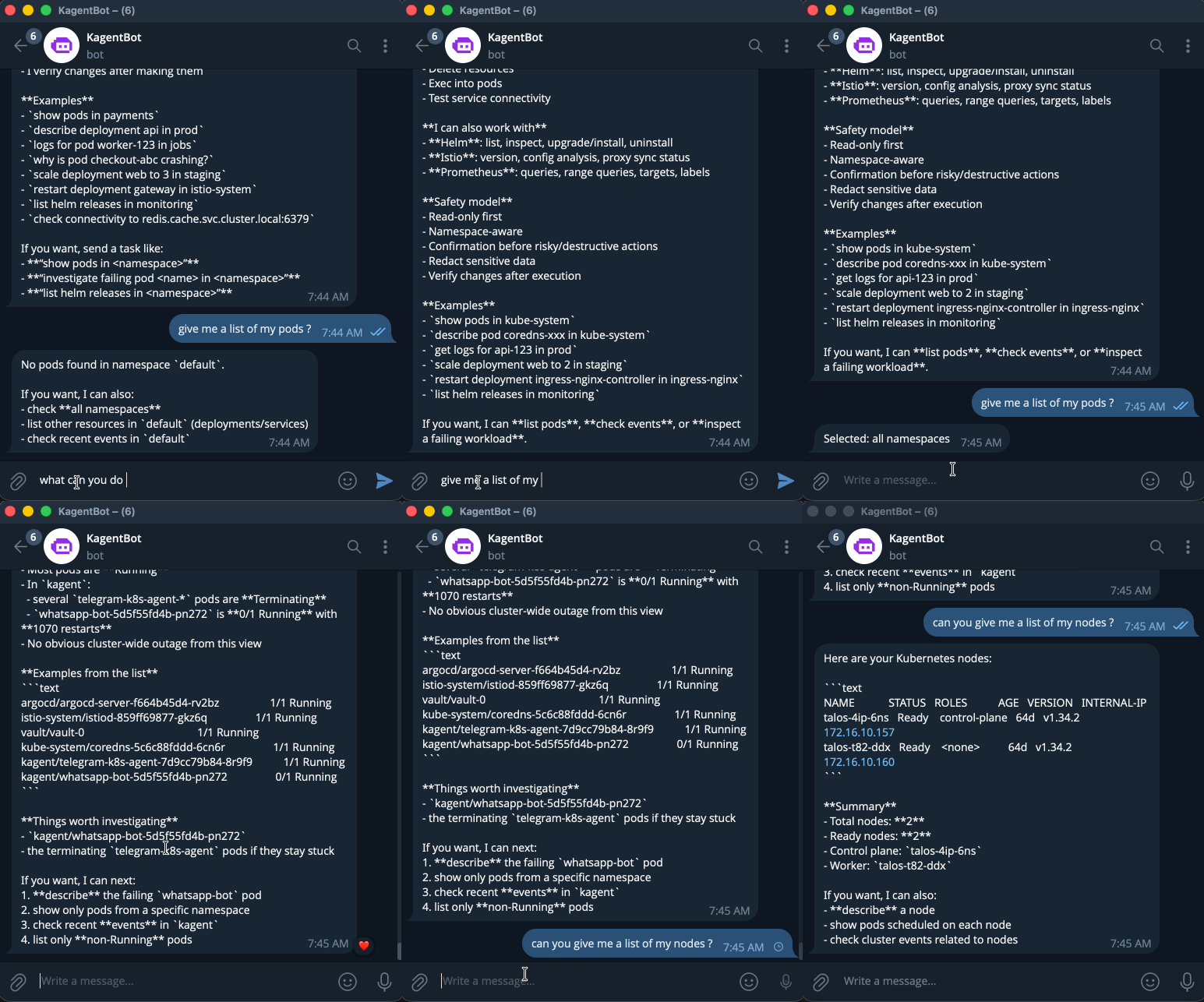
What if you could manage your Kubernetes cluster from Telegram? Not through a half-baked webhook that runs kubectl — but through a real AI agent that understands context, uses tools, responds intelligently, and asks for your approval before doing anything destructive?
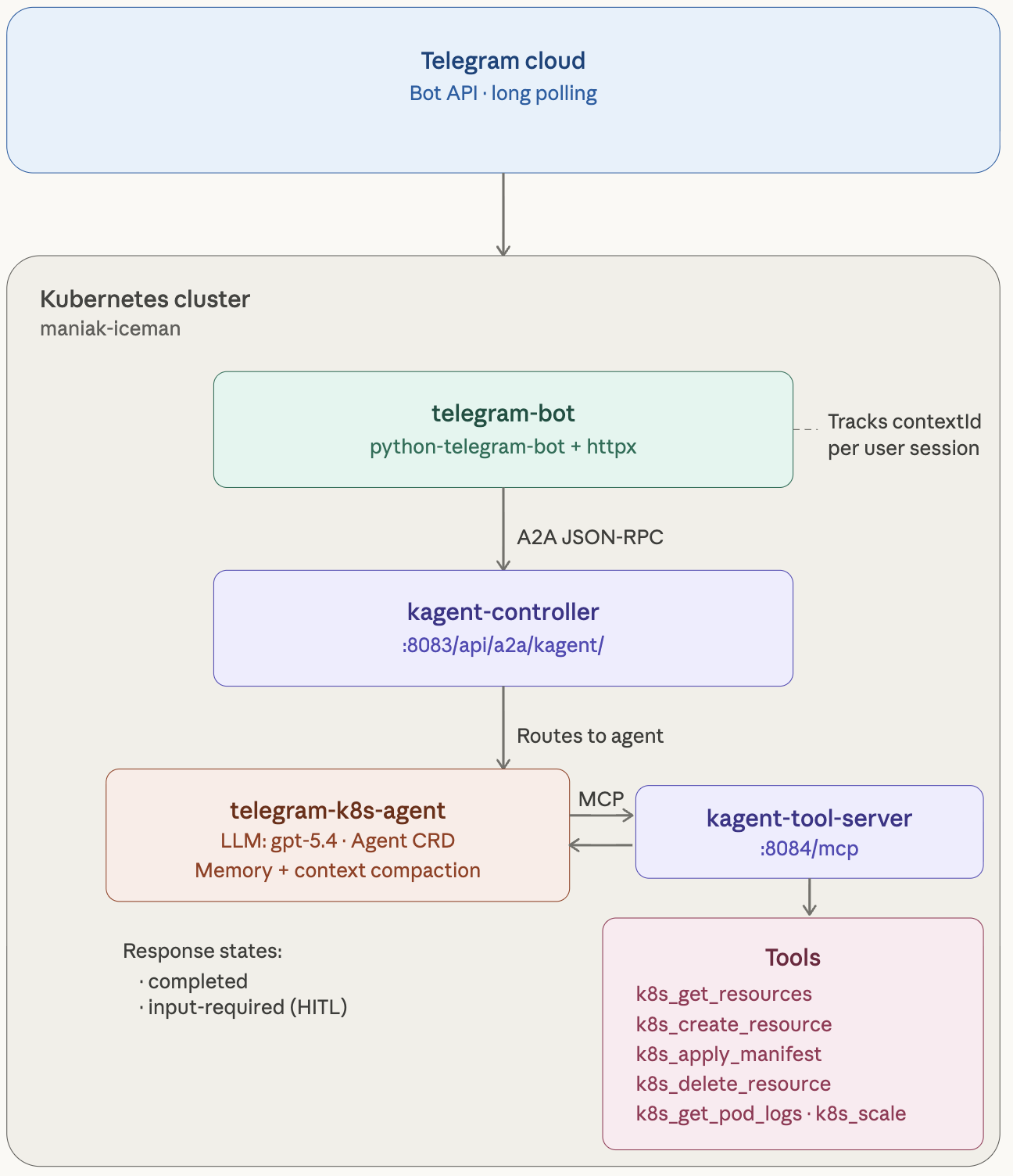
In this guide, I’ll walk you through how I built exactly that: a Telegram bot that connects to a kagent AI agent running on my home lab Kubernetes cluster (Talos Linux on Proxmox), giving me full cluster operations from my phone. The entire thing is deployed via GitOps with ArgoCD, secrets come from HashiCorp Vault, and the bot uses the A2A (Agent-to-Agent) protocol to communicate with kagent.
The bot maintains conversation continuity across messages (so the agent remembers what you were talking about), and supports Human-in-the-Loop (HITL) approval — when the agent wants to run a destructive operation like deleting a resource or applying a manifest, it shows you Approve/Reject buttons in Telegram before proceeding.
No webhooks. No public endpoints. Just polling from inside the cluster.
Architecture Overview#
Here’s what we’re building:
Steps#
Step 1: Create Your Telegram Bot#
- Open Telegram, search for @BotFather.
- Send
/newbot, pick a name and username. - Copy the bot token it gives you.
Step 2: Deploy a kagent Agent#
Prerequisite: kagent running in your cluster with
kmcpCRDs installed. If not, hit the quickstart first.
This agent has Kubernetes tools, Helm tools, and Prometheus — and it's exposed over A2A so any client (our Telegram bot, or anything else) can talk to it. Feel free to make changes as you please:
kubectl apply -f - <<EOFapiVersion: kagent.dev/v1alpha2kind: Agentmetadata:name: telegram-k8s-agentnamespace: kagentspec:description: "Kubernetes operations agent accessible via Telegram bot"type: Declarativedeclarative:modelConfig: default-model-configa2aConfig:skills:- id: k8s-operationsname: Kubernetes Operationsdescription: "Query, manage, and troubleshoot Kubernetes resources"examples:- "What pods are running in the default namespace?"- "Show me the logs for pod X"- "What Helm releases are installed?"tags: [kubernetes, operations]- id: cluster-monitoringname: Cluster Monitoringdescription: "Query Prometheus metrics and monitor cluster health"examples:- "What is the CPU usage across nodes?"tags: [monitoring, prometheus]systemMessage: |You are a Kubernetes operations agent accessible via Telegram.Keep responses concise and well-formatted for chat readability.tools:- type: McpServermcpServer:apiGroup: kagent.devkind: RemoteMCPServername: kagent-tool-servertoolNames:- k8s_get_resources- k8s_describe_resource- k8s_get_pod_logs- k8s_get_events- helm_list_releases- helm_get_release- prometheus_query_tool- datetime_get_current_time- k8s_delete_resource- k8s_apply_manifest- helm_upgrade- helm_uninstallrequireApproval:- k8s_delete_resource- k8s_apply_manifest- helm_upgrade- helm_uninstallEOF
Notice requireApproval — anything destructive (deleting resources, applying manifests, Helm upgrades) goes through Human-in-the-Loop approval in the kagent UI first. Nobody's accidentally nuking prod from a Telegram chat.
Verify it's working:
kubectl port-forward -n kagent svc/kagent-controller 8083:8083curl localhost:8083/api/a2a/kagent/telegram-k8s-agent/.well-known/agent.json
You should get back JSON with the agent's name and skills.
Step 3: Write the Bot#
The bot is ~460 lines of Python using python-telegram-bot (polling mode) and httpx for A2A calls. It handles three main concerns: A2A communication with session continuity, HITL approval flow via Telegram inline keyboards, and robust response parsing.
- The critical detail: contextId goes inside the message object, not in params. On the first message, we omit it — kagent returns a contextId in the result. We store that per Telegram user and send it on every subsequent message. This is what makes “tell me about nginx” followed by “now scale it to 3” work as a coherent conversation.
Let’s walk through it section by section.
- A2A Communication: The core of the bot — sending messages to kagent and tracking contextId for session continuity:
- Response Parsing: kagent returns text in different locations depending on the response state. The bot tries three sources in order:
- HITL Approval Flow: When kagent returns input-required, the bot parses the adk_request_confirmation data to figure out what tool the agent wants to run, then shows Telegram inline keyboard buttons:
requirements.txt#
python-telegram-bot>=21.0
httpx>=0.27.0main.py#
"""Telegram bot that forwards messages to a kagent A2A agent."""import logging, os, uuidfrom pathlib import Pathimport httpxfrom telegram import Updatefrom telegram.ext import Application, CommandHandler, MessageHandler, filterslogging.basicConfig(level=logging.INFO)TELEGRAM_BOT_TOKEN = os.environ["TELEGRAM_BOT_TOKEN"]KAGENT_A2A_URL = os.environ["KAGENT_A2A_URL"]async def send_a2a_task(message_text: str, session_id: str) -> str:"""Send a message to the kagent A2A endpoint and return the response."""task_id = str(uuid.uuid4())payload = {"jsonrpc": "2.0","id": task_id,"method": "message/send","params": {"id": task_id,"message": {"role": "user","parts": [{"kind": "text", "text": message_text}],},},}async with httpx.AsyncClient(timeout=120.0) as client:resp = await client.post(KAGENT_A2A_URL,json=payload,headers={"Content-Type": "application/json"},)resp.raise_for_status()data = resp.json()result = data.get("result", {})artifacts = result.get("artifacts", [])if artifacts:parts = artifacts[-1].get("parts", [])texts = [p.get("text", "") for p in parts if p.get("kind") == "text"]if texts:return "\n".join(texts)return "Agent returned no text response."# Per-user session trackinguser_sessions: dict[int, str] = {}def get_session(user_id: int) -> str:if user_id not in user_sessions:user_sessions[user_id] = str(uuid.uuid4())return user_sessions[user_id]async def start_command(update: Update, _) -> None:await update.message.reply_text("Hello! I'm connected to a kagent Kubernetes agent.\n\n""Send me any message and I'll forward it to the agent.\n\n""Commands:\n""/start - Show this message\n""/new - Reset your conversation session")async def new_command(update: Update, _) -> None:user_id = update.effective_user.iduser_sessions[user_id] = str(uuid.uuid4())await update.message.reply_text("Session reset. Starting fresh conversation.")async def handle_message(update: Update, _) -> None:user_id = update.effective_user.idsession_id = get_session(user_id)thinking_msg = await update.message.reply_text("Thinking...")try:response = await send_a2a_task(update.message.text, session_id)for i in range(0, len(response), 4000): # Telegram 4096 char limitchunk = response[i : i + 4000]if i == 0:await thinking_msg.edit_text(chunk)else:await update.message.reply_text(chunk)except Exception as e:await thinking_msg.edit_text(f"Error contacting agent: {e}")def main() -> None:app = Application.builder().token(TELEGRAM_BOT_TOKEN).build()app.add_handler(CommandHandler("start", start_command))app.add_handler(CommandHandler("new", new_command))app.add_handler(MessageHandler(filters.TEXT & ~filters.COMMAND, handle_message))Path("/tmp/bot-healthy").touch() # For k8s probesapp.run_polling(drop_pending_updates=True)if __name__ == "__main__":main()
It uses polling — no ingress, no webhooks, no TLS to set up. Each Telegram user gets their own session so conversations keep context. Long responses get chunked automatically (Telegram's 4096-char limit). The /tmp/bot-healthy file is there for Kubernetes liveness probes.
Dockerfile#
FROM python:3.12-slimWORKDIR /appCOPY requirements.txt .RUN pip install --no-cache-dir -r requirements.txtCOPY main.py .CMD ["python", "main.py"]
docker build -t your-registry/telegram-kagent-bot:latest .docker push your-registry/telegram-kagent-bot:latest
Step 4: Test It Locally#
Before you deploy anything, make sure it actually works.
# Terminal 1: port-forward kagentkubectl port-forward -n kagent svc/kagent-controller 8083:8083# Terminal 2: run the botpip install -r requirements.txtexport TELEGRAM_BOT_TOKEN=your_token_from_botfatherexport KAGENT_A2A_URL=http://127.0.0.1:8083/api/a2a/kagent/telegram-k8s-agent/python main.py
Open Telegram, find your bot, send "What pods are running?" — if you get a real answer, you're golden.
Step 5: Deploy to Kubernetes#
Store the bot token:
kubectl create secret generic telegram-bot-token -n kagent \--from-literal=TELEGRAM_BOT_TOKEN="your_token_from_botfather"
Using External Secrets Operator instead?
apiVersion: external-secrets.io/v1kind: ExternalSecretmetadata:name: telegram-bot-tokennamespace: kagentspec:refreshInterval: "1h"secretStoreRef:name: vault-backendkind: ClusterSecretStoretarget:name: telegram-bot-tokencreationPolicy: Ownerdata:- secretKey: TELEGRAM_BOT_TOKENremoteRef:key: telegramproperty: api_key
Deploy the bot:
apiVersion: apps/v1kind: Deploymentmetadata:name: telegram-botnamespace: kagentlabels:app: telegram-botspec:replicas: 1strategy:type: Recreateselector:matchLabels:app: telegram-bottemplate:metadata:labels:app: telegram-botspec:containers:- name: botimage: your-registry/telegram-kagent-bot:latestenv:- name: TELEGRAM_BOT_TOKENvalueFrom:secretKeyRef:name: telegram-bot-tokenkey: TELEGRAM_BOT_TOKEN- name: KAGENT_A2A_URLvalue: "http://kagent-controller.kagent.svc.cluster.local:8083/api/a2a/kagent/telegram-k8s-agent/"livenessProbe:exec:command: ["cat", "/tmp/bot-healthy"]initialDelaySeconds: 10periodSeconds: 30resources:requests:cpu: 50mmemory: 64Milimits:cpu: 200mmemory: 128Mi
The strategy is Recreate on purpose — Telegram polling doesn't support multiple consumers. Two pods polling the same bot token means duplicate or missed messages.
kubectl apply -f deployment.yaml
Take It Further#
The interesting part isn't the Telegram bot — it's the pattern. The bot is just a transport layer. A2A is the interface. That means:
- Multiple agents, one bot. Add Telegram commands like
/k8s,/istio,/securitythat route to different kagent agents. - Any chat platform. Swap
python-telegram-botfordiscord.pyorslack-bolt. Everything else stays the same. - Multi-modal. kagent supports image parts — screenshot a Grafana dashboard and ask "what's wrong here?"
- AgentGateway. Put AgentGateway in front of the A2A endpoint for rate limiting, auth, and observability.
Questions? Come find us on Discord.