 kagent
 agents can now run as MCP tasks on Agent Substrate#
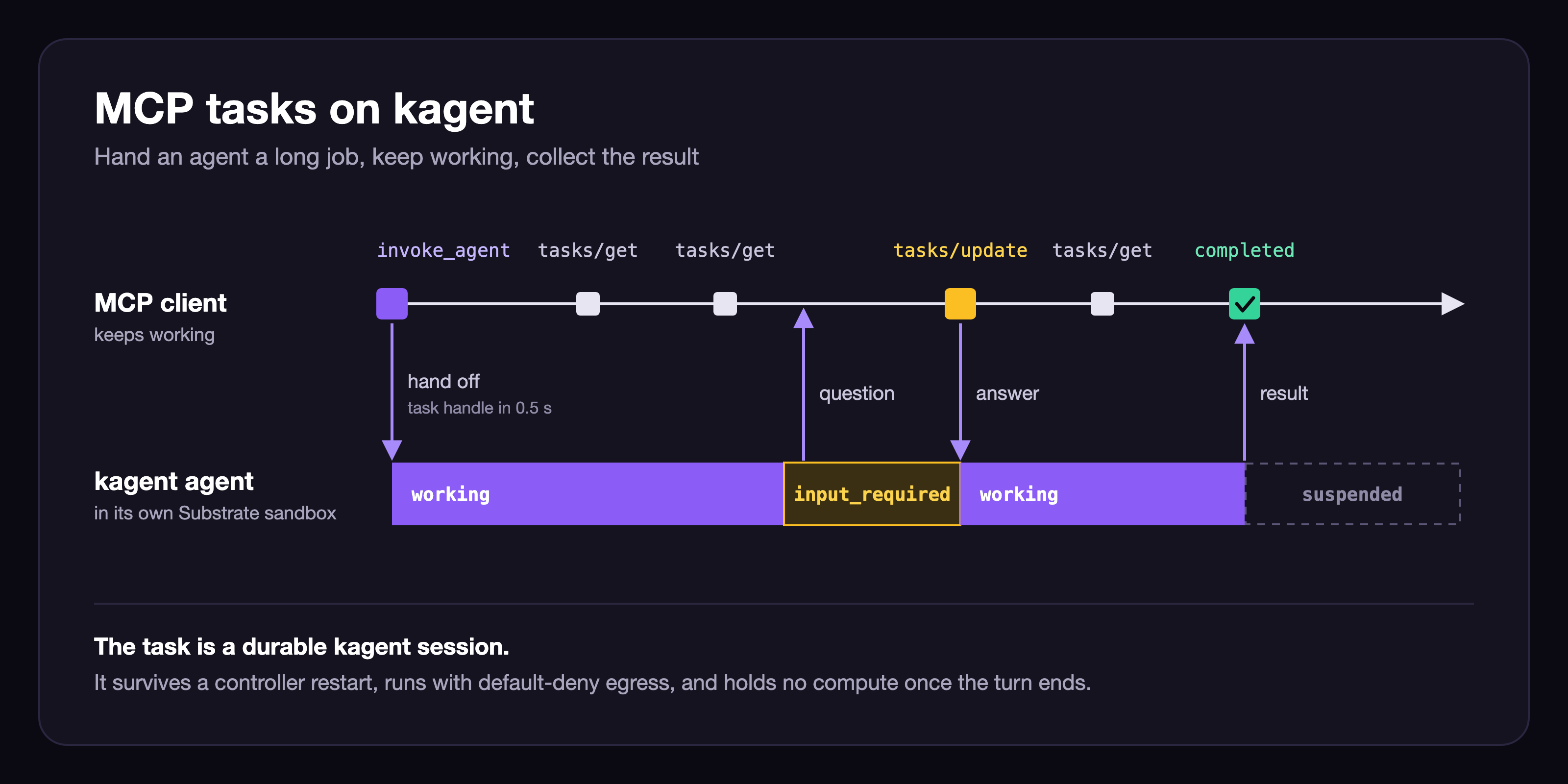
kagent agents run as MCP tasks. Any MCP client can hand a kagent agent a long job, get a task handle back straight away, and collect the result when it's ready.
MCP started as a way to call tools. A tool call is a function call: you send arguments, you wait, you get a result. That works for a lookup that takes 200 milliseconds. It doesn't work for an agent that needs three minutes to download a dataset, analyse it and write a report. The caller blocks, the connection times out, and the work is lost.
The MCP Tasks extension fixes that, and kagent implements it. With tasks, a client works with a kagent agent the way you'd work with a colleague: hand over the job, get on with something else, answer a question if one comes up, and pick up the result when it's done.
I ran all of this on kagent 1.0.1 on a local kind cluster. Every command and every output below is from that run.
Every agent is already on the endpoint#
The kagent controller serves a Streamable HTTP MCP endpoint at /mcp on port 8083. You don't deploy anything to get it, and you don't wrap your agents. Create an Agent and it's callable.
The agent in this post is kev-analyst. It writes patch-priority briefs from the CISA Known Exploited Vulnerabilities catalog. It runs on Agent Substrate with default-deny egress, so it gets one egress policy for the one host it needs:
kubectl apply -f - <<EOFapiVersion: api.kagent.dev/v1alpha3kind: EgressPolicymetadata:name: cisa-kevnamespace: kagentspec:destinations:- origin: https://www.cisa.gov---apiVersion: api.kagent.dev/v1alpha3kind: Agentmetadata:name: kev-analystnamespace: kagentspec:harnessRef:name: kagent-defaultegressPolicyRefs:- name: cisa-kevtemplate:inline:description: Researches the CISA Known Exploited Vulnerabilities catalog and writes a patch-priority briefmodelConfig:name: default-model-configsystemPrompt: |-You are a vulnerability analyst. You write patch-priority briefs from the CISA Known Exploited Vulnerabilities (KEV) catalog.If the request does not name a vendor or product to focus on, ask which one with the ask_user tool before you do anything else.Never answer from memory. Download the catalog first with the bash tool:wget -qO /data/workspace/kev.json https://www.cisa.gov/sites/default/files/feeds/known_exploited_vulnerabilities.jsonThen analyse the file with bash tools such as grep, head and wc. Do not print the whole file.The brief lists the matching vulnerabilities, newest first, with the CVE ID, product, date added, due date, and whether it is used in ransomware campaigns. End with the three to patch first and why.If a command fails, say so and show the error.EOF
To talk to the endpoint, forward the controller port:
kubectl port-forward -n kagent svc/kagent-controller 8083:8083
The endpoint is stateless. There's no handshake to keep alive and no session to pin to a replica. Each request says what the client supports, including the tasks extension. That makes a 20-line shell script a complete client. Save this as mcp.sh:
#!/usr/bin/env bash# Minimal MCP client for kagent: one JSON-RPC request per call, no session.# usage: mcp.sh <method> '<params json>'set -euo pipefailmethod=$1params=${2:-'{}'}meta='{"io.modelcontextprotocol/protocolVersion":"2026-07-28","io.modelcontextprotocol/clientInfo":{"name":"curl","version":"1"},"io.modelcontextprotocol/clientCapabilities":{"extensions":{"io.modelcontextprotocol/tasks":{}}}}'body=$(jq -cn --arg m "$method" --argjson p "$params" --argjson meta "$meta" \'{jsonrpc:"2.0",id:1,method:$m,params:($p+{_meta:$meta})}')name=$(jq -r '.name // .taskId // empty' <<<"$params")curl -s -X POST "${KAGENT_MCP:-http://localhost:8083/mcp}" \-H 'Content-Type: application/json' \-H 'Accept: application/json, text/event-stream' \-H 'Mcp-Protocol-Version: 2026-07-28' \-H "Mcp-Method: $method" ${name:+-H "Mcp-Name: $name"} \-d "$body" | sed 's/^data: //;/^event:/d;/^$/d' | jq '(.result // .error) | del(._meta)'
Ask the endpoint which agents it has:
./mcp.sh tools/call '{"name":"list_agents","arguments":{}}' | jq -c .structuredContent
{"agents":[{"name":"kev-analyst","namespace":"kagent"}]}
Hand off long-running work#
The problem: a tool call has to finish before the caller can move on.
With tasks: invoke_agent returns a task handle as soon as kagent accepts the turn.
./mcp.sh tools/call '{"name": "invoke_agent","arguments": {"agent": {"namespace": "kagent", "name": "kev-analyst"},"message": "Write a patch-priority brief for Microsoft Windows vulnerabilities added to the KEV catalog in 2026."}}'
{"taskId": "v1.eyJzZXNzaW9uSWQiOiIwMWEyMTM1OC0xMDlmLTc4YWIt...","status": "working","createdAt": "2026-11-25T15:34:28.710228Z","lastUpdatedAt": "2026-11-25T15:34:28.710228Z","ttlMs": null,"pollIntervalMs": 1000,"resultType": "task"}
That came back in half a second. The agent then worked for 2 minutes and 46 seconds. To check on it, call tasks/get with the task ID:
./mcp.sh tasks/get '{"taskId":"v1.eyJzZXNzaW9uSWQiOiIwMWEyMTM1OC0xMDlmLTc4YWIt..."}'
While the agent is busy the status is working. When it finishes, the same call returns completed and the result:
{"taskId": "v1.eyJzZXNzaW9uSWQiOiIwMWEyMTM1OC0xMDlmLTc4YWIt...","status": "completed","createdAt": "2026-11-25T15:34:28.710228Z","lastUpdatedAt": "2026-11-25T15:37:14.482Z","resultType": "complete","result": {"structuredContent": {"session_id": "01a21358-109f-78ab-aa6d-7cf962fda7f4","task_id": "01a21358-1255-7303-8436-a1811ef54477","state": "TASK_STATE_COMPLETED","text": "I downloaded and analyzed the CISA KEV catalog ... Three to patch first (priority rationale) ..."}}}
The brief listed 15 Windows entries and picked three to patch first, two of them because the catalog marks them as used in ransomware campaigns.
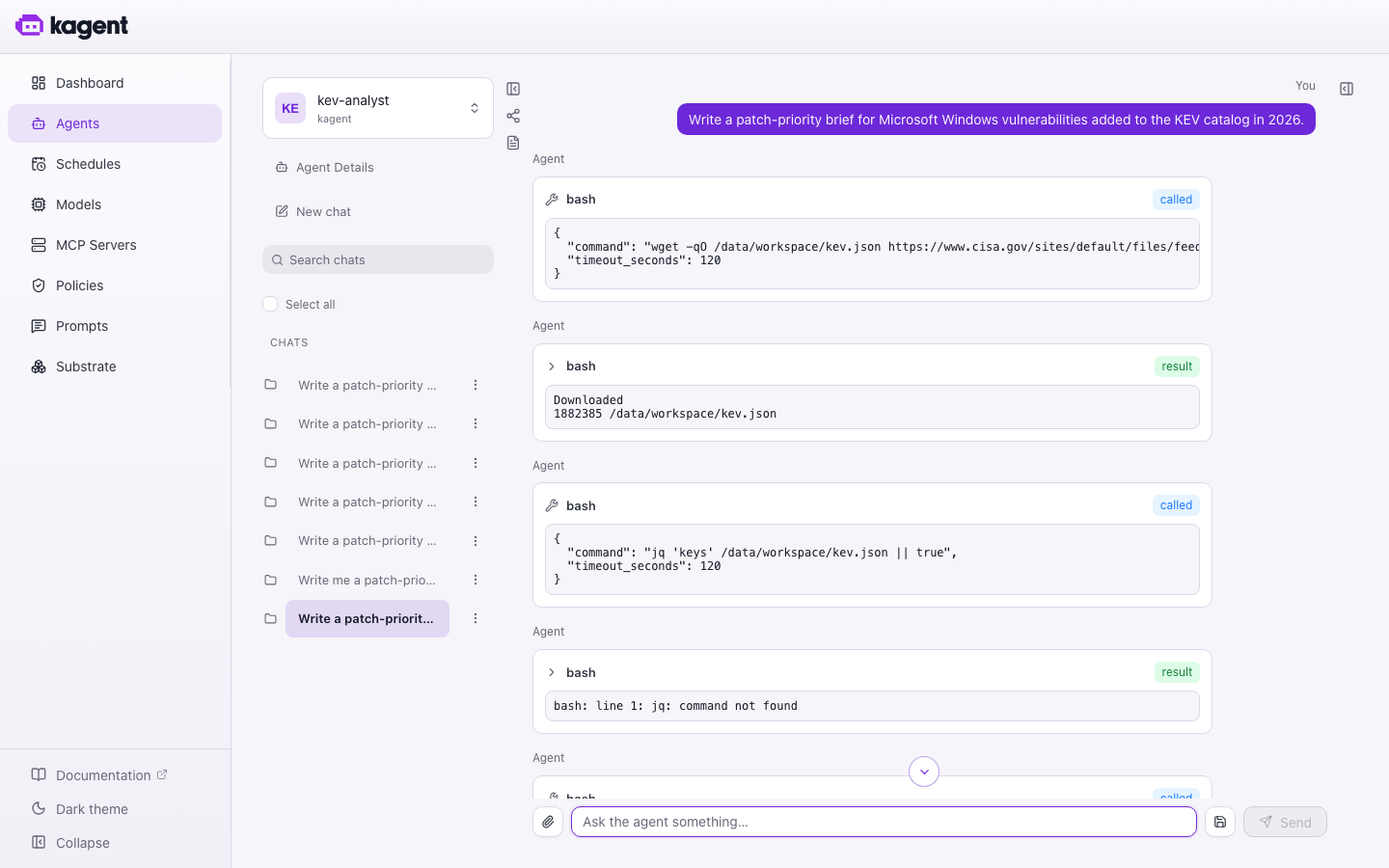
Nothing about the work is hidden behind the task handle. The task is an ordinary kagent session, so it's in the UI with every step the agent took:
Answer a question in the middle of the job#
The problem: a long job often needs one more fact from the person who asked for it. With a plain tool call, the only options are to guess or to fail.
With tasks: the agent pauses and the task moves to input_required.
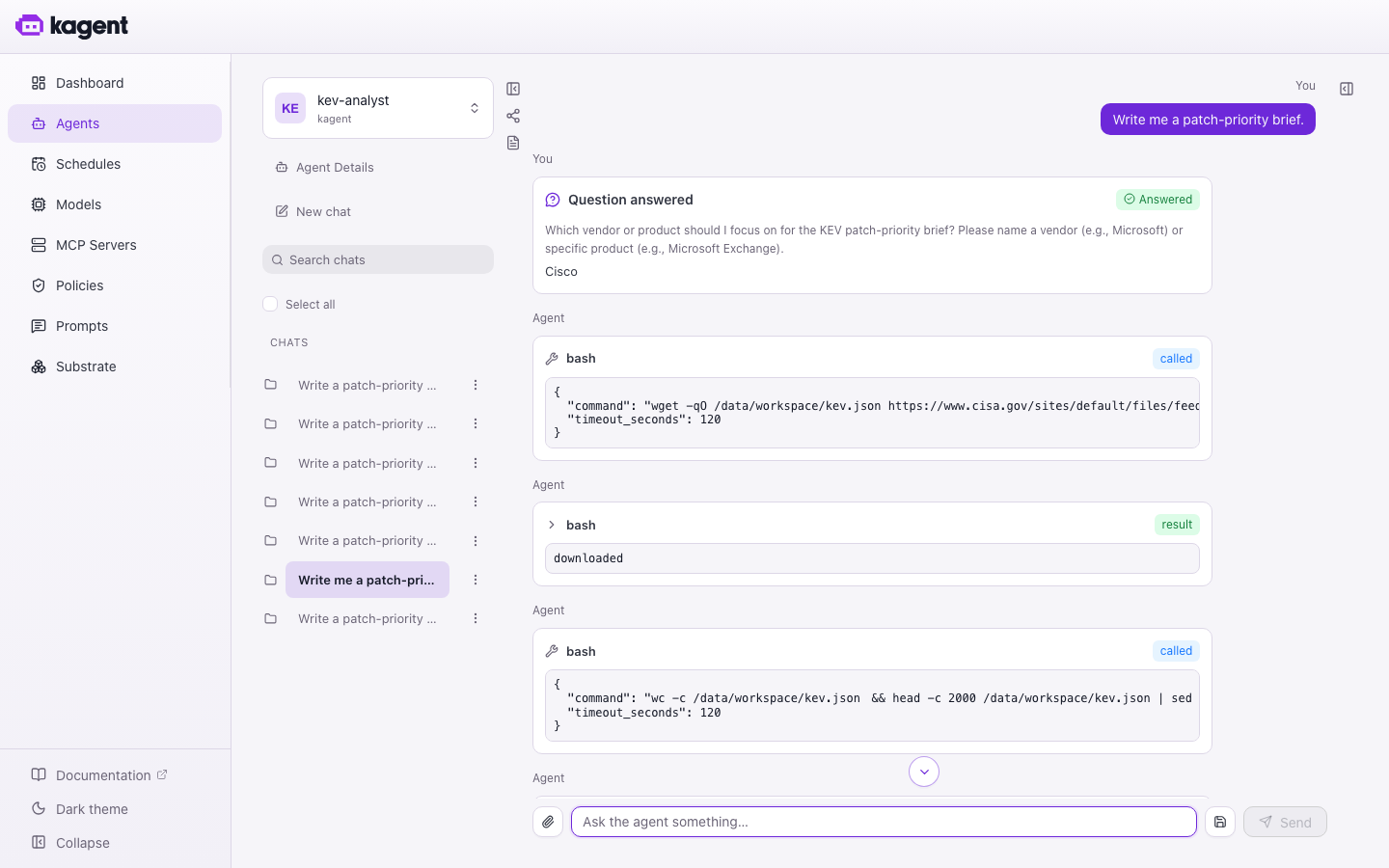
I sent a request that leaves out the vendor on purpose:
./mcp.sh tools/call '{"name": "invoke_agent","arguments": {"agent": {"namespace": "kagent", "name": "kev-analyst"},"message": "Write me a patch-priority brief."}}'
Three seconds later, tasks/get showed the agent waiting, with its question as a form the client can render:
{"status": "input_required","statusMessage": "Which vendor or product should I focus on for the KEV patch-priority brief? Please name a vendor (e.g., Microsoft) or specific product (e.g., Microsoft Exchange).","inputRequests": {"01a2135a-c827-73a4-9122-aa67d0c58ea3": {"method": "elicitation/create","params": {"mode": "form","message": "Which vendor or product should I focus on for the KEV patch-priority brief? ...","requestedSchema": {"type": "object","properties": {"response": {"type": "string", "description": "Which vendor or product should I focus on ..."}},"required": ["response"]}}}}}
Answer with tasks/update, using the key of the input request:
./mcp.sh tasks/update '{"taskId": "v1.eyJzZXNzaW9uSWQiOiIwMWEyMTM1YS1iZDA5LTcwNmMt...","inputResponses": {"01a2135a-c827-73a4-9122-aa67d0c58ea3": {"action": "accept","content": {"response": "Cisco"}}}}'
The task went back to working and the agent wrote the Cisco brief. The same mechanism carries kagent's tool approvals: when an agent needs sign-off before it runs a tool, the task asks the client for a yes or no.
Stop a job you no longer need#
Start a task, change your mind, and call tasks/cancel:
./mcp.sh tasks/cancel '{"taskId":"v1.eyJzZXNzaW9uSWQiOiIwMWEyMTM1YS1mODMyLTc1MzUt..."}'./mcp.sh tasks/get '{"taskId":"v1.eyJzZXNzaW9uSWQiOiIwMWEyMTM1YS1mODMyLTc1MzUt..."}'
{"taskId": "v1.eyJzZXNzaW9uSWQiOiIwMWEyMTM1YS1mODMyLTc1MzUt...","status": "cancelled","createdAt": "2026-11-25T15:37:38.749549Z","lastUpdatedAt": "2026-11-25T15:37:46.912Z","resultType": "complete"}
The agent stops. It doesn't keep spending model tokens on a brief nobody will read.
Built on Agent Substrate#
Handing off a job is only useful if the job is safe to leave alone. That part isn't MCP. It's the runtime underneath, and it's where kagent is different.
The task is durable. kagent doesn't keep a separate table of MCP tasks. The task ID is an opaque reference to a session and an A2A task that kagent already stores in its database. To test it, I started a task and restarted the controller 15 seconds later:
kubectl rollout restart deployment/kagent-controller -n kagent
The new controller was up 15 seconds after that. I called tasks/get with the same task ID. It said working, and 84 seconds later it said completed, with the full Fortinet brief. The agent never noticed, because it doesn't run in the controller. It runs in its own sandbox on a Substrate worker.
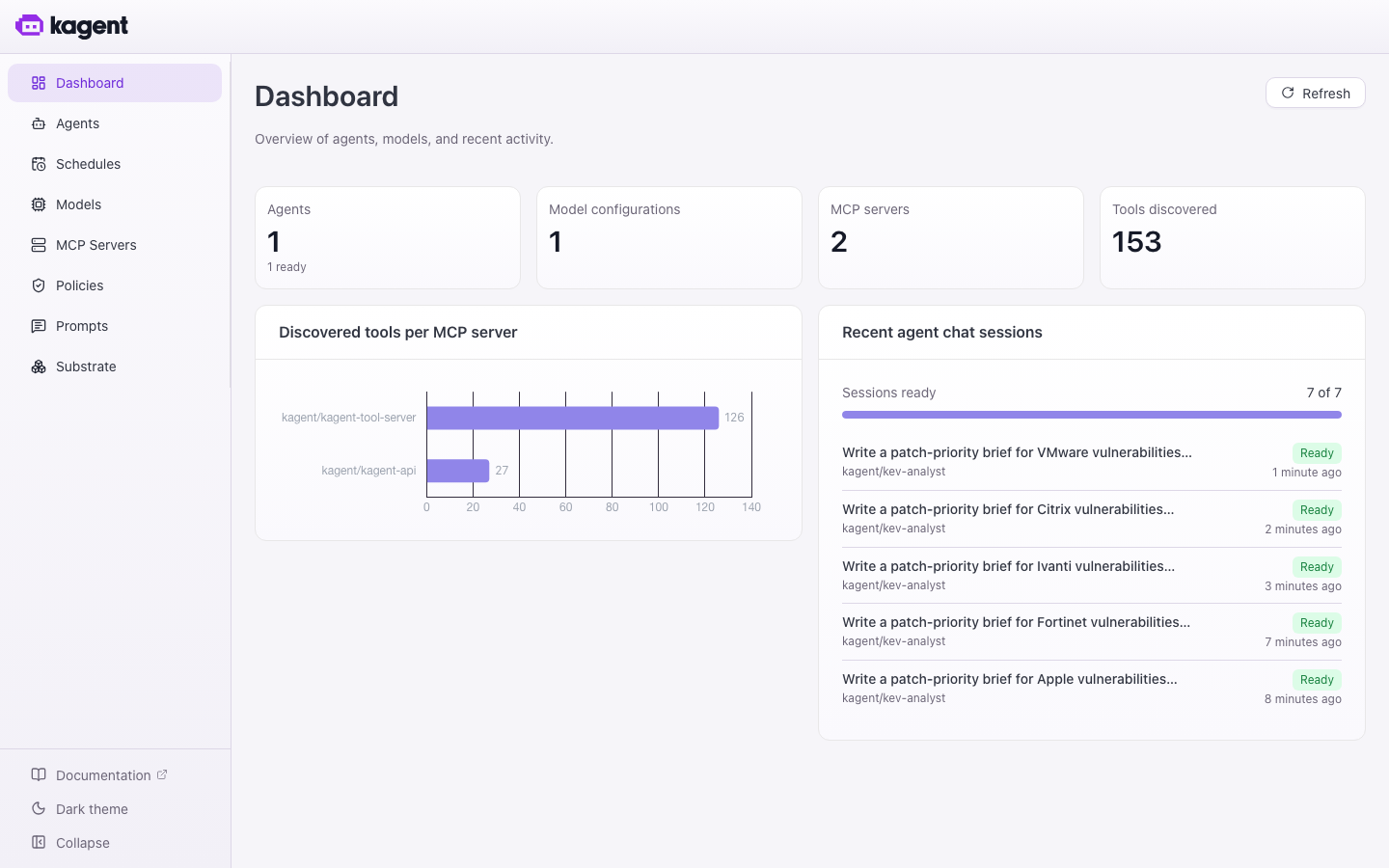
Every task gets its own sandbox. Each session is an Actor in a gVisor sandbox, started from a prepared snapshot. Seven tasks means seven isolated workspaces. One task can't read another's files.
The agent can't wander. Substrate denies outbound traffic by default. kev-analyst can reach its model and www.cisa.gov, because that's what its egress policy allows, and nothing else. That matters more when nobody is watching the job.
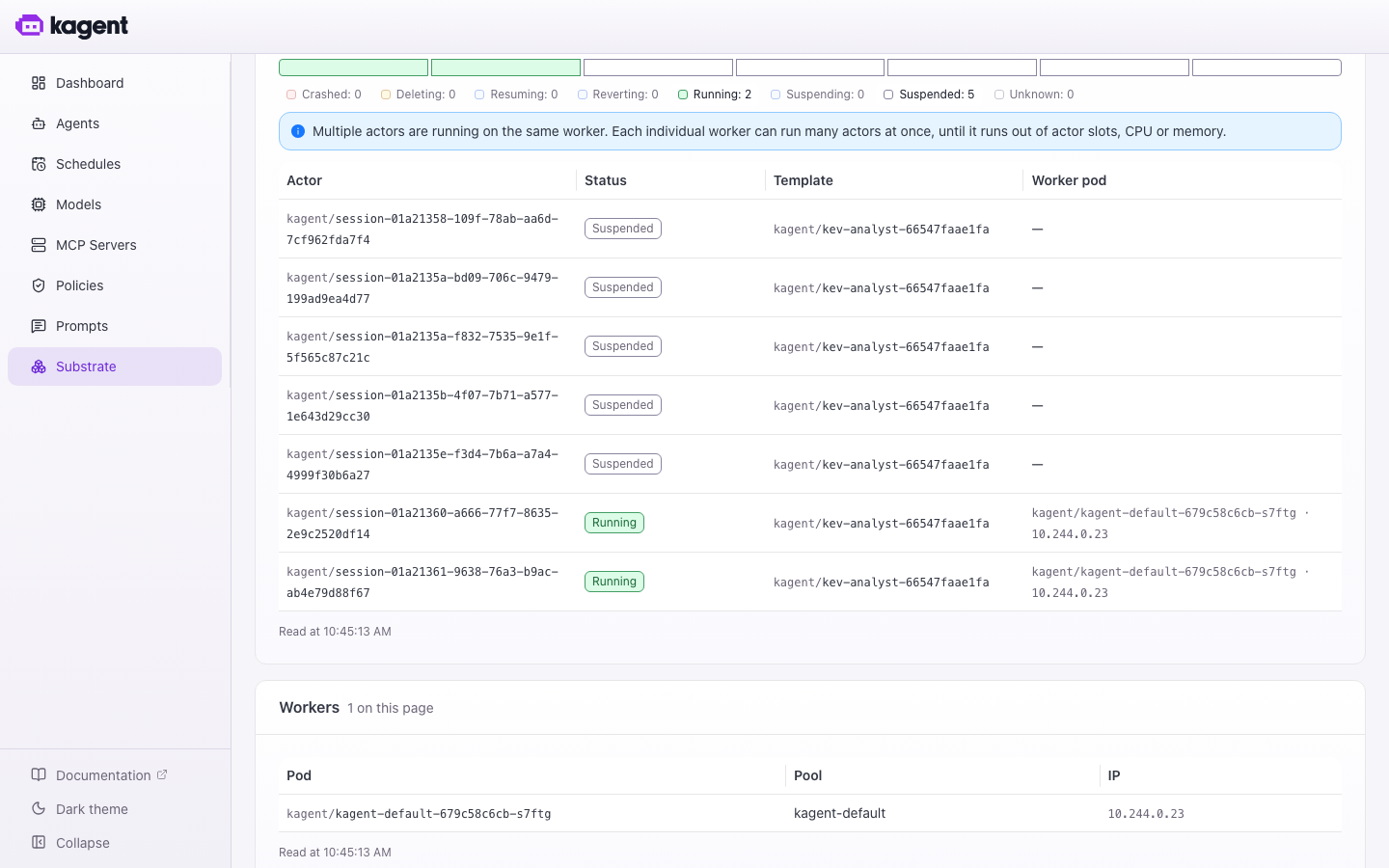
A finished task costs nothing. When a turn ends, Substrate suspends the Actor. The result stays in the database and the session can be resumed with a follow-up, but no compute is held. Here's the Substrate page after seven tasks, with two still in flight:
It's the same task everywhere. MCP is one more way in to the same control plane. A task started over MCP shows up in the UI and over A2A, with the same history.
Good to know#
- Clients that don't support tasks still work. If a client doesn't declare the tasks extension,
invoke_agentis an ordinary tool call that blocks until the agent answers. - Follow up in the same session. Pass the
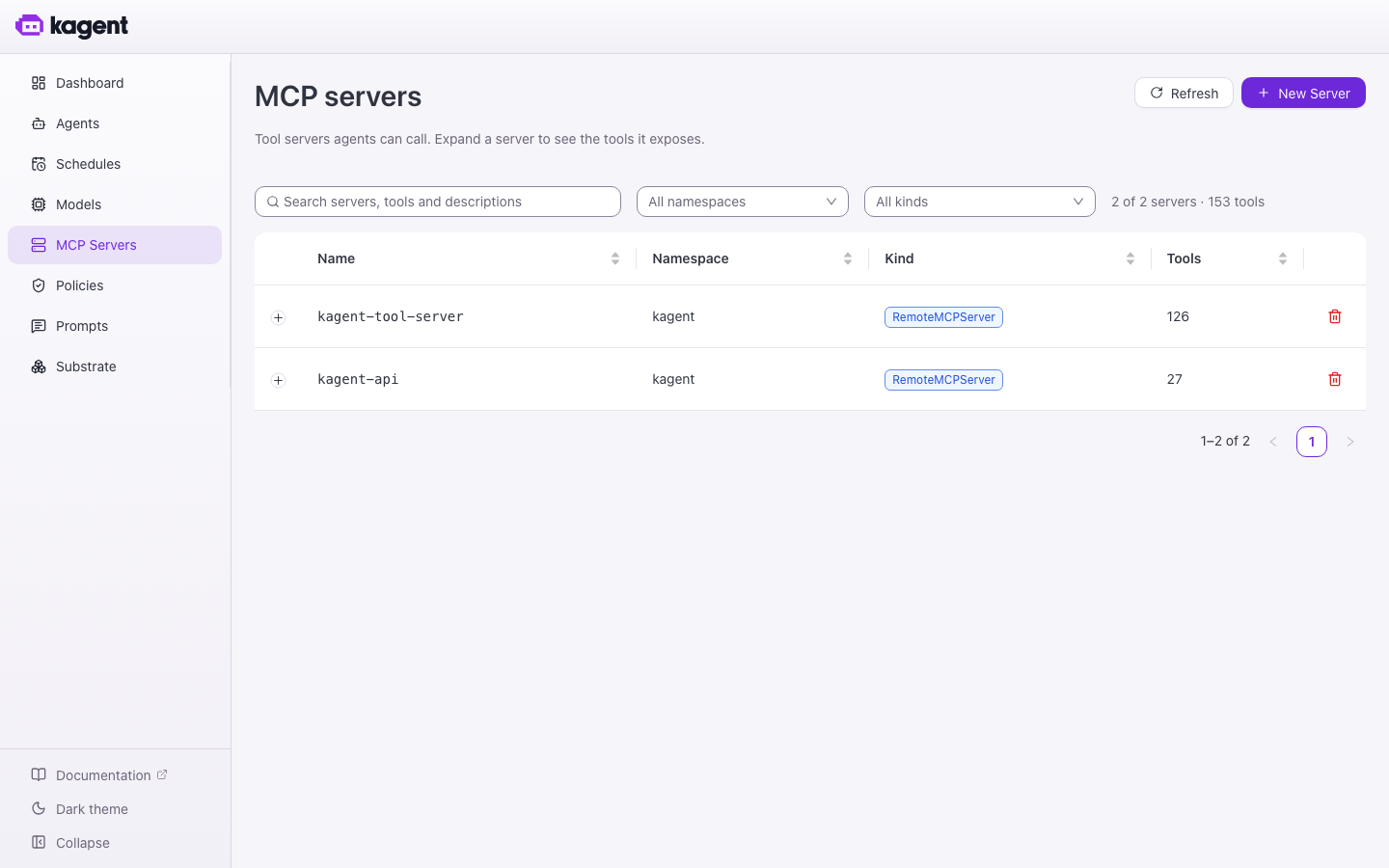
session_idfrom a result back toinvoke_agentin place ofagent. The Actor resumes with its files and its conversation. I asked the first session to list its workspace ten minutes after it had been suspended, andkev.jsonwas still there, all 1,882,385 bytes of it. - There's more on the endpoint. It has 27 tools: sessions, checkpoints, forking a session from a checkpoint, and standalone sandboxes. kagent also registers the endpoint as an MCP server named
kagent-api, so your own agents can use those tools. - Sort out authentication before you expose it. The CLI install is a development setup, and it accepted my calls without credentials. The endpoint sits behind the same authenticator as the rest of the kagent API.
Try it#
You need a cluster, a model API key, and one command:
kind create cluster --name kagent --image kindest/node:v1.37.0export OPENAI_API_KEY=your-keycurl -sL https://kagent.dev/install | bash && kagent install
Then apply the agent above, forward port 8083, and hand it a job.
- Install Agent Substrate in One Command with the kagent CLI: the full install walkthrough.
- kagent Has a Policies Page Now: how egress policies work, screen by screen.
- kagent 1.0 Is Here: Open Source Agents on Agent Substrate: why agents run on Substrate.
- The MCP architecture notes in the kagent repository: how the endpoint maps MCP tasks to A2A tasks.
The task support was built by the kagent maintainers and contributors in the open. If you try it with your own MCP client, tell us how it went on GitHub or Discord.