Code Share: Deploy kagent with Agent Substrate#
Agent sessions are bursty. A user asks a question, the agent thinks for a few seconds, then the session sits idle for minutes — or hours — waiting on the next turn. Plain Kubernetes handles this badly: an idle pod still books its CPU and memory, and a cold pod takes seconds to come back. Multiply that across thousands of conversations and you're paying for a lot of nothing.
Agent Substrate flips the model. It decouples the agent session from the pod: idle sessions are checkpointed — full RAM and filesystem, via gVisor — to object storage, the pod returns to a warm pool, and the session resumes sub-second on the next request, exactly where it left off. Think serverless scale-to-zero, but for stateful agents.
kagent is the Kubernetes-native agent control plane. Wire substrate in as its execution layer and a declarative SandboxAgent becomes a gVisor actor instead of a long-running Deployment.
The big idea, in plain English#
Picture a small hotel with a handful of rooms and a lot of guests.
- The rooms are your pods (substrate calls them workers). They're expensive to build, so you keep only a few, and you keep them ready to use.
- Each guest is one agent conversation (an actor). A guest is only in the room while they're actually doing something.
- When a guest steps out, you don't leave the room sitting empty on the clock. You snapshot the room exactly as it is — the open laptop, the papers on the desk, the half-finished coffee — pack it into storage, and give the room to the next guest.
- When the first guest comes back, you restore their room in under a second, precisely how they left it. They never know it was gone.
That's Agent Substrate. A few "rooms" (pods) serve far more "guests" (agent sessions) than you have rooms — because idle guests are parked in cheap storage instead of holding a room hostage. The rest of this article is the concepts, the use cases, and the exact commands to build that hotel on your laptop.
This guide covers three things:
- What a substrate is (concepts from learn.agentsubstrate.dev)
- What you can actually accomplish with it (use cases)
- How to set it up with kagent OSS on a throwaway kind cluster — one-shot script or manual Helm
Runnable code for this path lives in
01-kagent-agent-substrate. Prefer a guided lab? Same flow in the Instruqt workshop.
What is Agent Substrate?#
Short version: it lets a handful of pods behave like thousands of always-on agents, by putting the idle ones to sleep in cheap storage and waking them instantly when needed.
Here's the official definition, from the atlas at learn.agentsubstrate.dev:
Agent Substrate is a Kubernetes-native runtime for highly-multiplexed actor workloads — AI agents, sandboxed environments, stateful services. It decouples actor lifecycle from Pods, so a small pool of pre-warmed gVisor workers can host 30× more actors than there are pods, by suspending idle actors to object storage and restoring them on demand.
Kubernetes is excellent at long-running services. It is not excellent at:
| Pain | Why K8s struggles | What substrate does |
|---|---|---|
| Idle agents | Pods still consume CPU/memory | Suspend to object storage; reclaim the worker |
| Millions of sessions | API server / etcd not built for that QPS | Actors live in Valkey/Redis, not as one CR per session |
| Sub-second wake | kube-scheduler + image pull is seconds | Pre-warmed workers; resume bypasses the scheduler |
| Stateful scale-to-zero | Volumes don't attach/detach at agent speed | Full RAM + filesystem checkpoint via gVisor |
Architecture bet in one sentence: Kubernetes provisions infrastructure; substrate schedules actors.
Core concepts (glossary)#
These terms show up everywhere in the UI, CRDs, and grpcurl surface. Don't let the ate* names scare you — sticking with the hotel picture: an actor is a guest, a worker is a room, a snapshot is the guest's packed-up room in storage, and everything starting with ate is hotel staff (the front desk, the concierge, the bellhop). Definitions match learn.agentsubstrate.dev/concepts.
| Term | Meaning |
|---|---|
| Actor | One logical agent session. Has its own RAM, filesystem, and identity — but is not pinned to a pod. Can suspend on worker A and resume on worker B. |
| Worker | A pre-warmed pod that hosts at most one actor at a time (IDLE or assigned). Fungible hosting slot, not the agent itself. |
| WorkerPool | CRD for a Deployment of warm workers. You size concurrency by scaling the pool. |
| ActorTemplate | Immutable "class" for actors (image, entrypoint, pool, snapshot location). Creating one builds a golden snapshot (version 0). |
| Golden snapshot | Fresh, just-booted image of the template. Brand-new actors restore from this instead of cold-booting. |
| Snapshot | Checkpoint of RAM + sentry/filesystem state in S3/GCS (zstd). Resume uses demand paging so only touched pages load. |
| Suspend / Resume | Checkpoint to object storage and free the worker / restore sub-second into an idle worker. |
| ateapi | Control plane: actor lifecycle, worker assignment, suspend/resume workflows (gRPC). |
| atenet | L7 router + DNS. Per-request resolve of which worker hosts an actor; triggers resume if suspended. |
| atelet | Node DaemonSet: pulls images, downloads snapshots, talks to ateom-gvisor over a Unix socket. |
| ateom-gvisor | In-worker helper that shells out to runsc checkpoint / runsc restore. |
Actor lifecycle#
CreateActor → SUSPENDED
     │
     ▼
ResumeActor → RESUMING → RUNNING
     │                      │
     │                      ▼
     │               SuspendActor → SUSPENDING → SUSPENDED
     │
     └── DeleteActor (from SUSPENDED)
Only RUNNING holds a worker. Between chat turns a declarative session is typically SUSPENDED.
Request path (why resume is fast)#
On each HTTP hit to an actor:
- DNS resolves
actorId.actors.resources.substrate.ate.dev→ atenet router (not the worker IP). - ExtProc extracts the actor ID and calls ateapi
ResumeActor. - ateapi picks an idle worker from Redis (no kube-scheduler), asks atelet to restore the snapshot.
- ateom-gvisor runs
runsc restore -background— sentry comes up immediately; pages fault in on demand. - Router rewrites
:authorityto the worker pod and forwards the request.
In plain English: a message comes in, the router figures out which "guest" it's for, wakes them up into any free room if they were asleep, and forwards the message. If the guest was already awake, it just forwards — no wake-up needed. Either way, you never pay for an empty room.
Warm path (already RUNNING): skip restore, just route. Cold path (SUSPENDED): restore + route. No idle pod tax either way.
Deep dive: Resume actor end-to-end · System topology.
What can you accomplish? (use cases)#
Substrate is framework-agnostic at the OCI/gVisor layer. With kagent OSS on top, these are the practical outcomes.
1. Dense multi-session chat agents (this guide)#
Many concurrent declarative conversations without one Deployment per session.
- Each UI/chat session becomes a short-lived actor.
- After the turn, the actor snapshots back; the worker serves the next session.
- One small WorkerPool multiplexes far more sessions than it has pods (~30× oversubscription is the design point).
You get: serverless economics for stateful chat, with memory and filesystem preserved across turns.
2. Sandboxed cluster assistants (Kubernetes tools in a box)#
Run a SandboxAgent with MCP tools (k8s_get_resources, logs, events) inside gVisor.
- Isolation: hostile or buggy tool use stays in the sandbox.
- Density: idle assistants don't pin CPUs.
- Identity: actor is a first-class substrate identity, not "whatever ServiceAccount the pod had forever."
This demo's hello-substrate is exactly that pattern — a Kubernetes assistant actor on the default pool.
3. Coding harnesses and long-lived sandboxes (AgentHarness)#
kagent can place OpenClaw / Hermes-style harnesses on substrate (runtime: substrate).
- Shared actor for a coding session or workspace.
- Pins a worker while active (scale the pool: roughly
1 + active harnessesfor headroom). - Strong isolation for shell, git, and untrusted code.
See the kagent AgentHarness docs after this walkthrough.
4. Agent swarms / many-actor demos#
Substrate's own demos (e.g. many stateful counter actors on few workers) show the multiplexing thesis: hundreds of stateful actors on a handful of pods.
You get: a path toward "millions of idle agents, thousands of wakeups/sec" without etcd holding every session.
5. Security-minded agent platforms#
- gVisor (or micro-VM class) per actor.
- Egress can sit behind agentgateway so agents never hold provider keys (Solo's enterprise pattern).
- Snapshot-to-storage means you can reclaim compute without losing session state.
North-star metrics from the architecture docs: ~100 ms activation p95, extreme scale of idle actors, high wakeup throughput. Treat those as direction, not an SLA for the kind lab.
Architecture on kind#
What you will run:
┌──────────────────────────── kind cluster (kagent-substrate) ────────────────────────────┐
│                                                                                          │
│   namespace: kagent                          namespace: ate-system                       │
│   ┌────────────────────┐                     ┌──────────────────────────────────────┐   │
│   │ kagent-controller  │  controller.substrate.* │ ate-api-server  (scheduling)      │   │
│   │ kagent-ui          │ ───────────────────────▶│ atenet-router   (L7 routing)      │   │
│   │ SandboxAgent       │                     │   │ atelet          (node supervisor) │   │
│   │   hello-substrate  │                     │   │ valkey-cluster  (state)           │   │
│   │ WorkerPool         │                     │   │ rustfs          (snapshots/S3)    │   │
│   │   kagent-default   │                     │   └──────────────────────────────────────┘ │
│   └────────────────────┘                                                                  │
└──────────────────────────────────────────────────────────────────────────────────────────┘| Layer | Role |
|---|---|
Agent Substrate (ate-system) | Multiplex actors onto warm workers; suspend/resume via gVisor + object storage. |
kagent (kagent) | Agent CRDs, UI, model provider (OpenAI); substrate as execution layer. |
SandboxAgent | Declarative agent → substrate actor (not a long-running Deployment). |
Pinned versions (this guide)#
| Component | Version |
|---|---|
| Agent Substrate | 0.0.8 |
| kagent (OSS) | 0.10.0-beta6 |
| gVisor actor image | ghcr.io/kagent-dev/substrate/ateom-gvisor:v0.0.8 |
| kind | v0.31.0 |
| Node image | kindest/node:v1.35.0 (any 1.31+ works) |
Pairing matters. Substrate 0.0.8 matches kagent 0.10.0-beta6 ateapi/
CreateActorprotos so UI chat works. Substrate 0.0.9 broke that wire format — only bump together with a matching kagent. Node image matters. Substrate CRDs use CELformat.dns1123Label/dns1123Subdomain(Kubernetes 1.31+). Old kind defaults reject the CRDs.
Prerequisites#
- Linux host or VM (~8 vCPU / 16 GB RAM). Valkey (6) + control plane is heavy for a laptop-sized VM.
- Docker running
- OpenAI API key (real LLM calls)
- Optional:
grpcurl+jqfor the control-plane section
macOS / Windows: prefer a cloud Linux VM (
n1-standard-8,m5.2xlarge, …). Docker Desktop often fails the gVisor checkpoint path.
Quick start (one-shot script)#
From the demo directory:
export OPENAI_API_KEY="sk-..."# optional: cp .env.example .env && edit .envchmod +x setup.sh teardown.sh./setup.sh
setup.sh installs tools if missing, creates kind, installs substrate + kagent (wired), and applies manifests/hello-substrate.yaml.
Open the UI:
kubectl -n kagent port-forward svc/kagent-ui 8080:8080# → http://localhost:8080 → Agents → hello-substrate
Tear down:
./teardown.sh
Script knobs#
| Env var | Default | Meaning |
|---|---|---|
OPENAI_API_KEY | (required) | Model provider key |
KIND_CLUSTER | kagent-substrate | kind cluster name |
SUBSTRATE_VERSION | 0.0.8 | Substrate chart |
KAGENT_VERSION | 0.10.0-beta6 | kagent chart |
WORKER_POOL_REPLICAS | 2 | Warm workers (2 helps golden-snapshot blue-green) |
SKIP_TOOLS=1 | off | Don't auto-install kubectl/helm/kind/… |
SKIP_CLUSTER=1 | off | Reuse existing cluster |
SKIP_AGENT=1 | off | Skip applying the sample agent |
Manual walkthrough (same path as the script)#
Env#
export OPENAI_API_KEY="sk-..."export KIND_CLUSTER=kagent-substrateexport SUBSTRATE_VERSION=0.0.8export KAGENT_VERSION=0.10.0-beta6
⚠️ Do not write
OPENAI_API_KEY=... helm ... --set ...="${OPENAI_API_KEY}"on one line — the variable expands before the assignment and you silently install with an empty key.
Step 1 — kind cluster#
kind create cluster --name "${KIND_CLUSTER}" --image kindest/node:v1.35.0 --wait 120skubectl get nodes
Step 2 — Agent Substrate#
JWT auth (ServiceAccount tokens) is the chart default — no feature gates.
helm upgrade --install substrate-crds \oci://ghcr.io/kagent-dev/substrate/helm/substrate-crds \--version "${SUBSTRATE_VERSION}" \--namespace ate-system --create-namespace --waithelm upgrade --install substrate \oci://ghcr.io/kagent-dev/substrate/helm/substrate \--version "${SUBSTRATE_VERSION}" \--namespace ate-system --wait --timeout 10mkubectl get pods -n ate-system
Expect ate-api-server, ate-controller, atelet-*, atenet-router, valkey-cluster-0..-5, rustfs Running (plus Completed init Jobs).
| Pod | Role |
|---|---|
ate-api-server | Control plane: lifecycle, scheduling, suspend/resume |
ate-controller | Reconciles WorkerPool + ActorTemplate |
atelet | Node supervisor: images, sandbox, object storage |
atenet-router | L7 route to the active worker |
valkey-cluster-* | Actor/worker state + locks |
rustfs | In-cluster S3 for snapshots |
Step 3 — kagent wired to substrate#
Order matters: install substrate first. The kagent controller crash-loops if ateapi is unreachable at startup.
helm upgrade --install kagent-crds \oci://ghcr.io/kagent-dev/kagent/helm/kagent-crds \--version "${KAGENT_VERSION}" \--namespace kagent --create-namespace --waithelm upgrade --install kagent \oci://ghcr.io/kagent-dev/kagent/helm/kagent \--version "${KAGENT_VERSION}" --namespace kagent --timeout 10m --wait \--set providers.default=openAI \--set providers.openAI.apiKey="${OPENAI_API_KEY}" \--set controller.substrate.enabled=true \--set controller.substrate.ateApiEndpoint="dns:///api.ate-system.svc:443" \--set controller.substrate.ateApiInsecure=true \--set controller.substrate.atenetRouterURL="http://atenet-router.ate-system.svc:80" \--set controller.substrate.ateApiTokenFile="/var/run/secrets/tokens/ate-api/token" \--set controller.substrate.defaultWorkerPool.namespace=kagent \--set controller.substrate.defaultWorkerPool.name=kagent-default \--set substrateWorkerPool.create=true \--set substrateWorkerPool.name=kagent-default \--set substrateWorkerPool.replicas=2 \--set substrateWorkerPool.ateomImage=ghcr.io/kagent-dev/substrate/ateom-gvisor:v0.0.8 \--set grafana-mcp.enabled=false \--set observability-agent.enabled=false
| Flag | Purpose |
|---|---|
controller.substrate.enabled=true | Turn on integration |
controller.substrate.ateApiEndpoint | Substrate control plane |
controller.substrate.atenetRouterURL | Request router |
substrateWorkerPool.create=true + .replicas=2 | Two warm workers |
| grafana / observability agents off | Avoid broken MCP when Grafana isn't installed |
If Helm times out on cold start:
kubectl wait deploy/kagent-controller -n kagent --for=condition=Available --timeout=10m
Verify:
kubectl get secret kagent-openai -n kagentkubectl get workerpools.ate.dev -A # expect kagent/kagent-defaultkubectl -n kagent port-forward deploy/kagent-controller 8083:8083 >/tmp/pf-ctrl.log 2>&1 &sleep 3curl -s http://localhost:8083/api/substrate/status; echo# expect "enabled": truekill %1 2>/dev/null
Step 4 — Deploy a SandboxAgent#
Manifest (also in the demo repo as manifests/hello-substrate.yaml):
apiVersion: kagent.dev/v1alpha2kind: SandboxAgentmetadata:name: hello-substratenamespace: kagentspec:type: Declarativedescription: A Kubernetes assistant running inside a substrate gVisor actordeclarative:# Go runtime is required for gVisor checkpoint/restore on substrate.runtime: gomodelConfig: default-model-configsystemMessage: |You are a helpful Kubernetes assistant running inside an Agent SubstrategVisor actor. Use the Kubernetes tools to answer questions about thecluster. When asked who you are, say "I am a Kubernetes agent runninginside a gVisor actor on Agent Substrate." Keep answers concise.tools:- type: McpServermcpServer:name: kagent-tool-serverkind: RemoteMCPServerapiGroup: kagent.devtoolNames:- k8s_get_resources- k8s_describe_resource- k8s_get_pod_logs- k8s_get_eventssubstrate:workerPoolRef:name: kagent-default
kubectl apply -f manifests/hello-substrate.yamlkubectl wait sandboxagent/hello-substrate -n kagent --for=condition=Ready --timeout=5mkubectl get sandboxagent -n kagentkubectl get actortemplates.ate.dev -n kagentkubectl get pods -n kagent -l ate.dev/worker-pool=kagent-default -o wide
The first golden snapshot takes ~60–90s. kagent projects the SandboxAgent into an owned ActorTemplate (and secrets); you don't hand-write the ate.dev CRDs for the happy path.
Step 5 — Chat and watch suspend / resume#
kubectl -n kagent port-forward svc/kagent-ui 8080:8080# http://localhost:8080 → Agents → hello-substrate
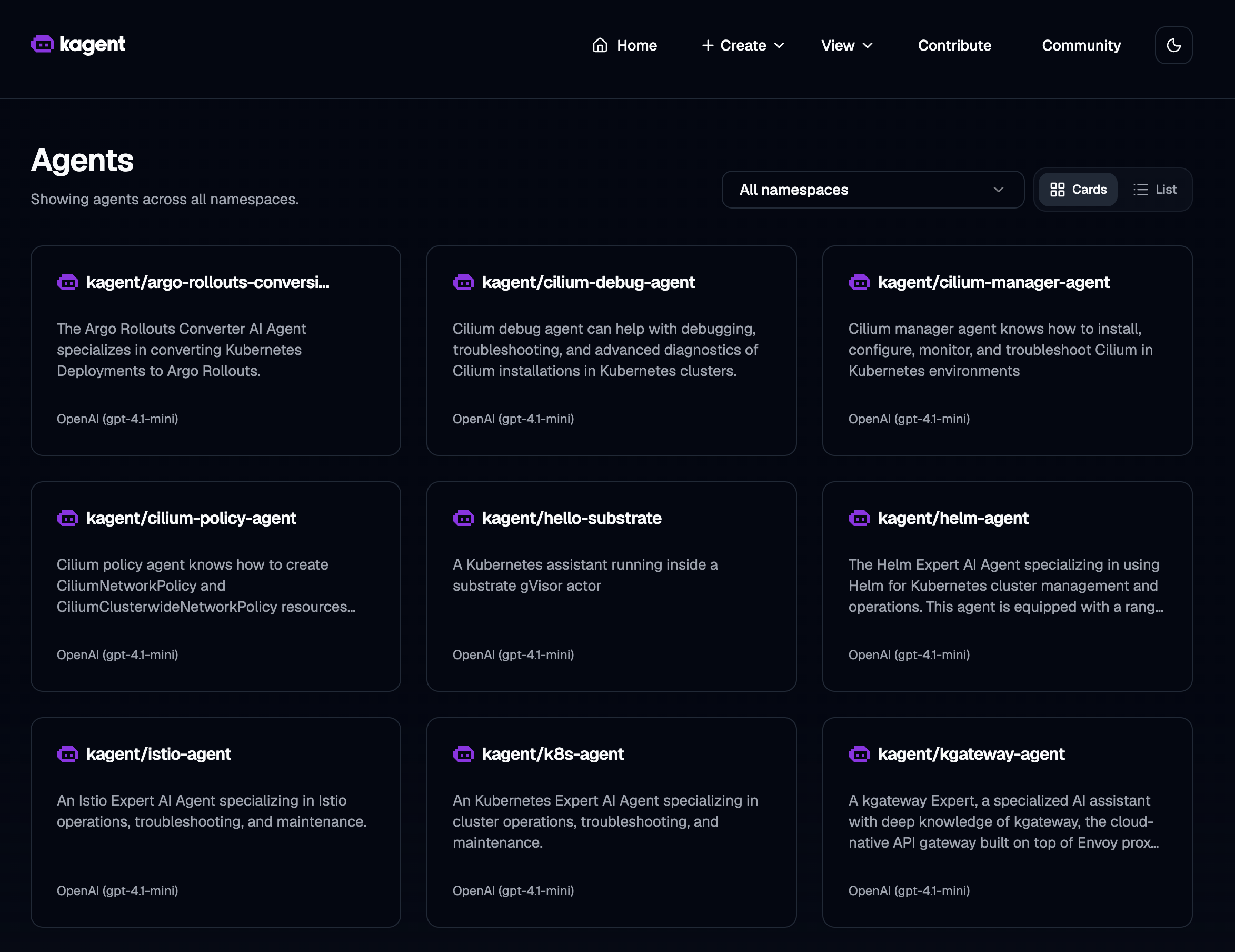
The Agents view lists every agent across namespaces — hello-substrate (our declarative Kubernetes assistant on the default pool) sits alongside the built-in kagent library (k8s, Helm, Istio, Cilium, kgateway, …). Open it to start a conversation.
Try:
What are you, and where are you running? Answer in one sentence. List pods in ate-system.
Between requests the session actor should sit Suspended (UI View → Substrate, or CLI below). Next message restores it sub-second.
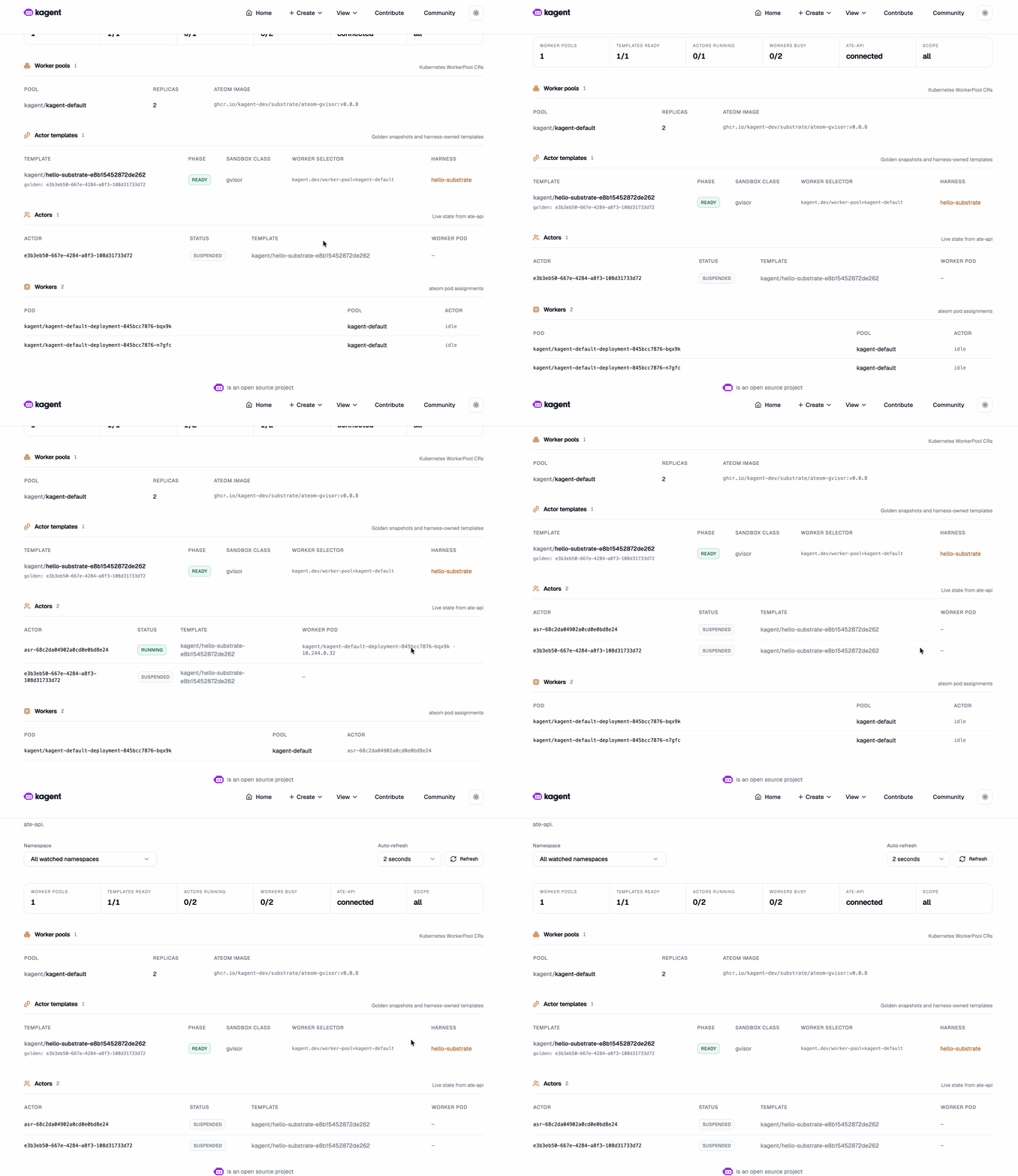
The View → Substrate page is where the multiplexing thesis becomes visible: the kagent-default WorkerPool (2 replicas on ateom-gvisor:v0.0.8), the hello-substrate ActorTemplate (READY, sandbox class gvisor, backed by its golden snapshot), the live actor flipping to SUSPENDED between turns, and both workers sitting idle — no pod tax while the session waits.
Drive ate-api with grpcurl#
kubectl port-forward -n ate-system svc/api 18443:443 >/tmp/pf-api.log 2>&1 &sleep 3TOKEN=$(kubectl create token kagent-controller -n kagent --audience=api.ate-system.svc --duration=15m)grpcurl -insecure -H "authorization: Bearer $TOKEN" -d '{}' \localhost:18443 ateapi.Control/ListWorkersgrpcurl -insecure -H "authorization: Bearer $TOKEN" -d '{}' \localhost:18443 ateapi.Control/ListActorsACTORS_JSON=$(grpcurl -insecure -H "authorization: Bearer $TOKEN" -d '{}' \localhost:18443 ateapi.Control/ListActors)ACTOR_ID=$(echo "$ACTORS_JSON" | jq -r '.actors[0].actorId // empty')ATESPACE=$(echo "$ACTORS_JSON" | jq -r '.actors[0].atespace // empty')# ResumeActor expects actor_ref { atespace, name } — not a bare actor_id field.if [ -n "${ACTOR_ID:-}" ] && [ -n "${ATESPACE:-}" ]; thengrpcurl -insecure -H "authorization: Bearer $TOKEN" \-d "{\"actor_ref\":{\"atespace\":\"$ATESPACE\",\"name\":\"$ACTOR_ID\"}}" \localhost:18443 ateapi.Control/ResumeActorfi
Scale the WorkerPool#
One worker can serve many sequential declarative sessions (each releases the slot after snapshot). Scale when you need overlapping sessions or harnesses that pin a slot:
kubectl scale workerpool kagent-default -n kagent --replicas=3
How kagent and substrate fit together#
 User / UI
    │
    ▼
 kagent (Agent / SandboxAgent CRDs, model config, tools)
    │  CreateActor / Resume on chat
    ▼
 Agent Substrate (ateapi + atenet + atelet + workers)
    │  gVisor sandbox per assigned actor
    ▼
Your agent binary (Go ADK) + MCP tools- Without substrate: kagent runs agents as ordinary Kubernetes Deployments (always-on pods).
- With substrate:
SandboxAgent+spec.substrate.workerPoolRef→ actor on the pool; suspend when idle.
Christian Posta's write-up frames the product story: agents are long-lived but idle; you need isolation (gVisor/Firecracker) and real lifecycle (suspend, snapshot, resume). Substrate + kagent is that path open-sourced under the kagent umbrella. See also Solo's blog and the official kagent Agent Substrate example.
Known issues & troubleshooting#
| Issue | Detail |
|---|---|
| Default pairing | Pin substrate 0.0.8 + kagent 0.10.0-beta6 for working chat protos. |
| Empty OpenAI key | Install "succeeds" without kagent-openai → CreateContainerConfigError. Export key, re-run ./setup.sh or Helm. |
| Controller crash-loop | Substrate not ready when kagent starts — fix ate-system first. |
| CRDs rejected | Node image below 1.31 — recreate with kindest/node:v1.35.0. |
| TLS on idle kind | In-cluster certs can expire after ~24h — run in one sitting. |
| Pre-1.0 | APIs will change; not production-ready. |
| Symptom | Fix |
|---|---|
| Substrate CRDs rejected | Recreate cluster with k8s 1.31+ node image |
kagent-controller crash-loops | All ate-system pods Running before kagent |
| Chat fails / ConfigError | kubectl get secret kagent-openai -n kagent |
| Helm timeout on kagent | kubectl wait deploy/kagent-controller … --timeout=10m |
ListActors auth errors | Re-mint token (15m) |
| SandboxAgent not Ready | WORKER_POOL_REPLICAS>=2; check workers + ActorTemplate status |
Cleanup#
./teardown.sh# or: kind delete cluster --name kagent-substrate
What's next#
| Path | Why |
|---|---|
01-kagent-agent-substrate | Runnable code for this guide: setup.sh, teardown.sh, manifests |
| learn.agentsubstrate.dev | Visual topology, resume flow, ateapi internals |
| AgentHarness on kagent | Long-lived coding sandboxes on substrate |
| agentgateway | Govern LLM/MCP egress; keep keys off the actor |
| kagent docs | Agents, tools, MCP, observability |
Suspend-and-resume is the feature that finally makes per-session stateful agents affordable at scale on Kubernetes. Spin it up, chat with hello-substrate, and watch a small worker pool serve far more sessions than it has pods.