 kagent
Anthropic Self-Hosted Sandboxes with kagent#
In May 2026, Anthropic released self-hosted sandboxes, allowing your Claude agents to provision sandboxes and execute code on your infrastructure. Anthropic hosts the agent loop, while kagent connects to Anthropic and runs the agent's code execution sandbox on your Kubernetes cluster.
As a new contributor, I was surprised that kagent aims to be a complete agentic solution regardless of your provider or harness. This integration is an example of doing things beyond running harnesses. In this post, we will create an agent on Anthropic, watch kagent provision a sandbox for it, and see how kagent suspends idle sandboxes while persisting their state. Although this post focuses on Anthropic, we plan on providing similar integrations for other managed agent platforms.
Prerequisites#
You will need Kind, the kagent CLI, and the Anthropic ant CLI to follow these instructions.
Install the kagent CLI.
curl -sL https://kagent.dev/install | bash -s -- --version v1.0.0
kagent version
See the Anthropic docs to install the Anthropic CLI. Then, log in to the CLI.
ant auth login # Or export ANTHROPIC_API_KEYNext, create a self-hosted environment on Claude Platform, and generate its environment key.
ANTHROPIC_ENVIRONMENT_ID=env_xxx
ANTHROPIC_ENVIRONMENT_KEY=sk-ant-oatxxx
Setup and Installation#
Start by provisioning a Kind cluster.
curl -fsSL https://raw.githubusercontent.com/kagent-dev/kagent/4de694355985e9d06dc92ad1adfa64d96d32f19e/scripts/kind/kind-config.yaml |kind create cluster --name kagent \--image kindest/node:v1.35.0 --config -
Store the environment key in a Kubernetes Secret so it isn't exposed in the controller's configuration.
kubectl create namespace kagentkubectl create secret generic anthropic-environment-key -n kagent \--from-literal=key="${ANTHROPIC_ENVIRONMENT_KEY}"
Next, create the configuration files for our kagent install.
VALUES_DIR=$(mktemp -d)cat > ${VALUES_DIR}/kagent-values.yaml <<EOFregistry: ghcr.iotag: 0.0.0-alpha.g4de694355985config:sandboxes:guestImage: ghcr.io/kagent-dev/kagent/sandbox-guest@sha256:94b1f9e216eee8778797d54b9d6e2b17b74089157d708097577b1479e4d92bd0controller:image:pullPolicy: Alwaysenv:- name: EXPERIMENTAL_ANTHROPIC_SELF_HOSTED_SANDBOXES_ENABLEDvalue: "true"- name: EXPERIMENTAL_ANTHROPIC_SELF_HOSTED_SANDBOXES_ENVIRONMENT_IDvalue: ${ANTHROPIC_ENVIRONMENT_ID}- name: EXPERIMENTAL_ANTHROPIC_SELF_HOSTED_SANDBOXES_ENVIRONMENT_KEYvalueFrom:secretKeyRef:name: anthropic-environment-keykey: key- name: EXPERIMENTAL_ANTHROPIC_SELF_HOSTED_SANDBOXES_TEMPLATE_NAMESPACEvalue: kagent- name: EXPERIMENTAL_ANTHROPIC_SELF_HOSTED_SANDBOXES_TEMPLATE_NAMEvalue: anthropic-self-hosted-sandboxEOFcat > ${VALUES_DIR}/config.yaml <<EOFinstall:kagent:repository: oci://ghcr.io/kagent-dev/kagent/helm/version: 0.0.0-alpha.g4de694355985valuesFiles:- kagent-values.yamlEOF
Install kagent in your cluster.
# This can take a while# OPENAI_API_KEY is only read if we want to create an agent using an OpenAI model, which we do not do.OPENAI_API_KEY=unset kagent --config "${VALUES_DIR}/config.yaml" install
Next, create the SandboxTemplate referenced above and its EgressPolicy.
These configure the sandboxes kagent will create for our Anthropic agents.
kubectl apply -f - <<EOFapiVersion: api.kagent.dev/v1alpha3kind: EgressPolicymetadata:name: anthropic-managed-agentsnamespace: kagentspec:destinations:- origin: https://*.anthropic.com---apiVersion: api.kagent.dev/v1alpha3kind: SandboxTemplatemetadata:name: anthropic-self-hosted-sandboxnamespace: kagentspec:workload:# Nightly sandbox-guest image containing ant v2.5.0.image: ghcr.io/kagent-dev/kagent/sandbox-guest@sha256:94b1f9e216eee8778797d54b9d6e2b17b74089157d708097577b1479e4d92bd0substrate:workerPoolRef:name: kagent-defaultsnapshotPolicy:location: gs://ate-snapshots/anthropic-managed-agents/egressPolicyRefs:- name: anthropic-managed-agentsEOFkubectl wait -n kagent --for=condition=Ready \sandboxtemplate/anthropic-self-hosted-sandbox --timeout=15m
In a separate terminal, port-forward the kagent controller on your local machine so the kagent CLI can connect to the control plane.
kubectl port-forward -n kagent service/kagent-controller 8083:8083kagent in action#
Create an Anthropic agent.
AGENT_ID=$(ant --format json beta:agents create \--name "kagent-sandbox-agent" \--model claude-haiku-5-5 \--system "You are a helpful coding agent that is testing a sandbox implementation. Your working directory is /data/workspace. Be concise." \--tool '{type: agent_toolset_20260401}' | \jq -r .id)
Then, create a session for the agent in your environment.
SESSION_ID=$(ant --format json beta:sessions create \--agent "$AGENT_ID" \--environment-id "$ANTHROPIC_ENVIRONMENT_ID" | \jq -r .id)
Open an interactive chat with the agent and ask it to create the /data/workspace/helloworld.txt file containing the Hello world! string.
ant beta:sessions connect "$SESSION_ID"
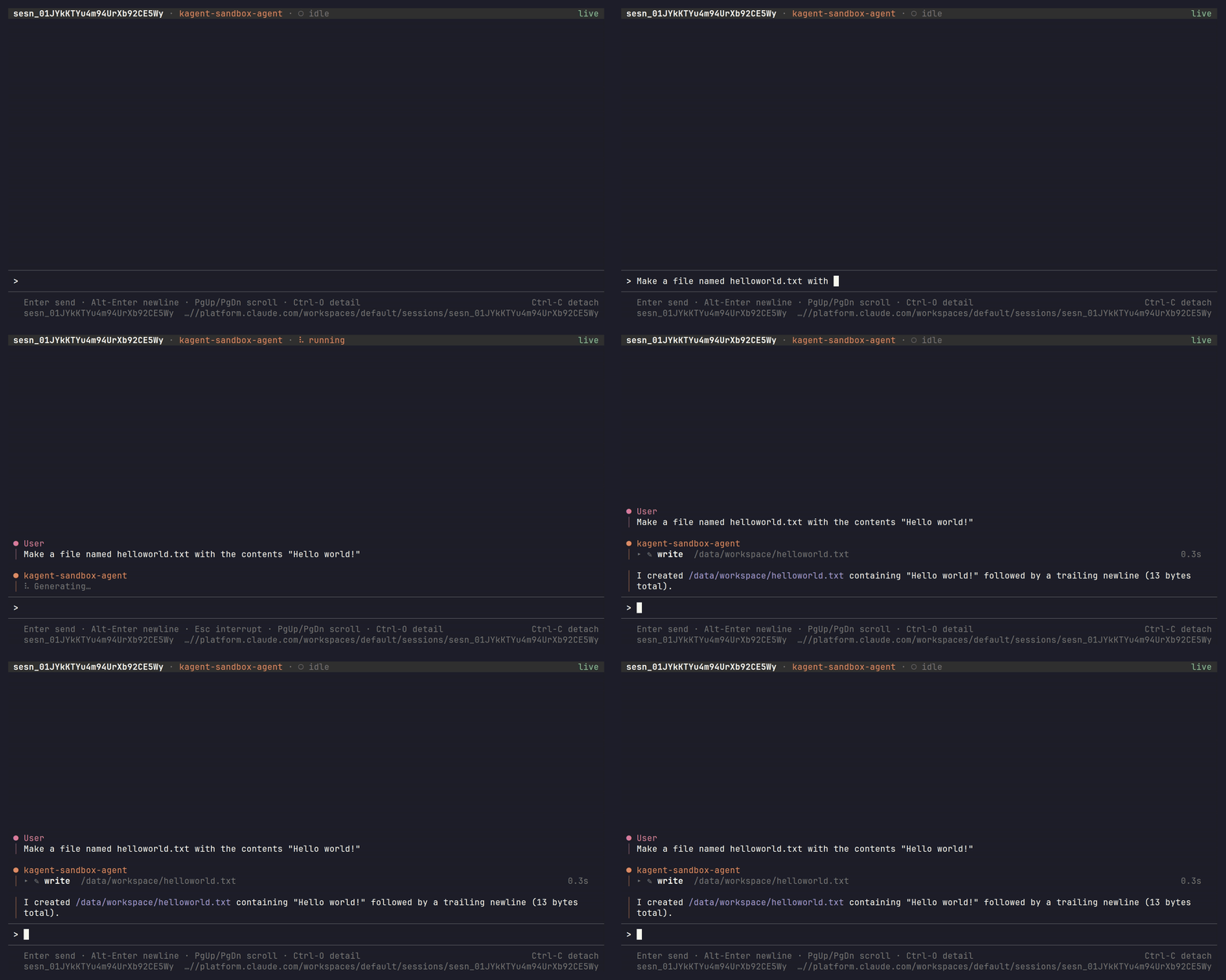
We can see that kagent provisioned a sandbox in our cluster by listing sandboxes in another terminal.
Note that you will have to set the ANTHROPIC_ENVIRONMENT_ID environment variable again.
USER_ID=$(printf '%s' 'kagent:anthropic-self-hosted-sandboxes' | base64 | tr '+/' '-_' | tr -d '=\n')USER_ID="${USER_ID}.$(printf '%s' "$ANTHROPIC_ENVIRONMENT_ID" | base64 | tr '+/' '-_' | tr -d '=\n')"kagent sandbox list --user-id "$USER_ID"
ID TEMPLATE STATE OPERATION EXPIRES FAILURE01a1b853-xxx kagent/anthropic-self-hosted-sandbox RUNTIME_STATE_READY RUNTIME_OPERATION_NONE 2026-11-08T11:24:07Z
After about five minutes without work, the sandbox automatically suspends and stops consuming CPU and memory.
$ kagent sandbox list --user-id "$USER_ID"ID TEMPLATE STATE OPERATION EXPIRES FAILURE01a1b853-xxx kagent/anthropic-self-hosted-sandbox RUNTIME_STATE_SUSPENDED RUNTIME_OPERATION_NONE 2026-11-08T11:24:07Z
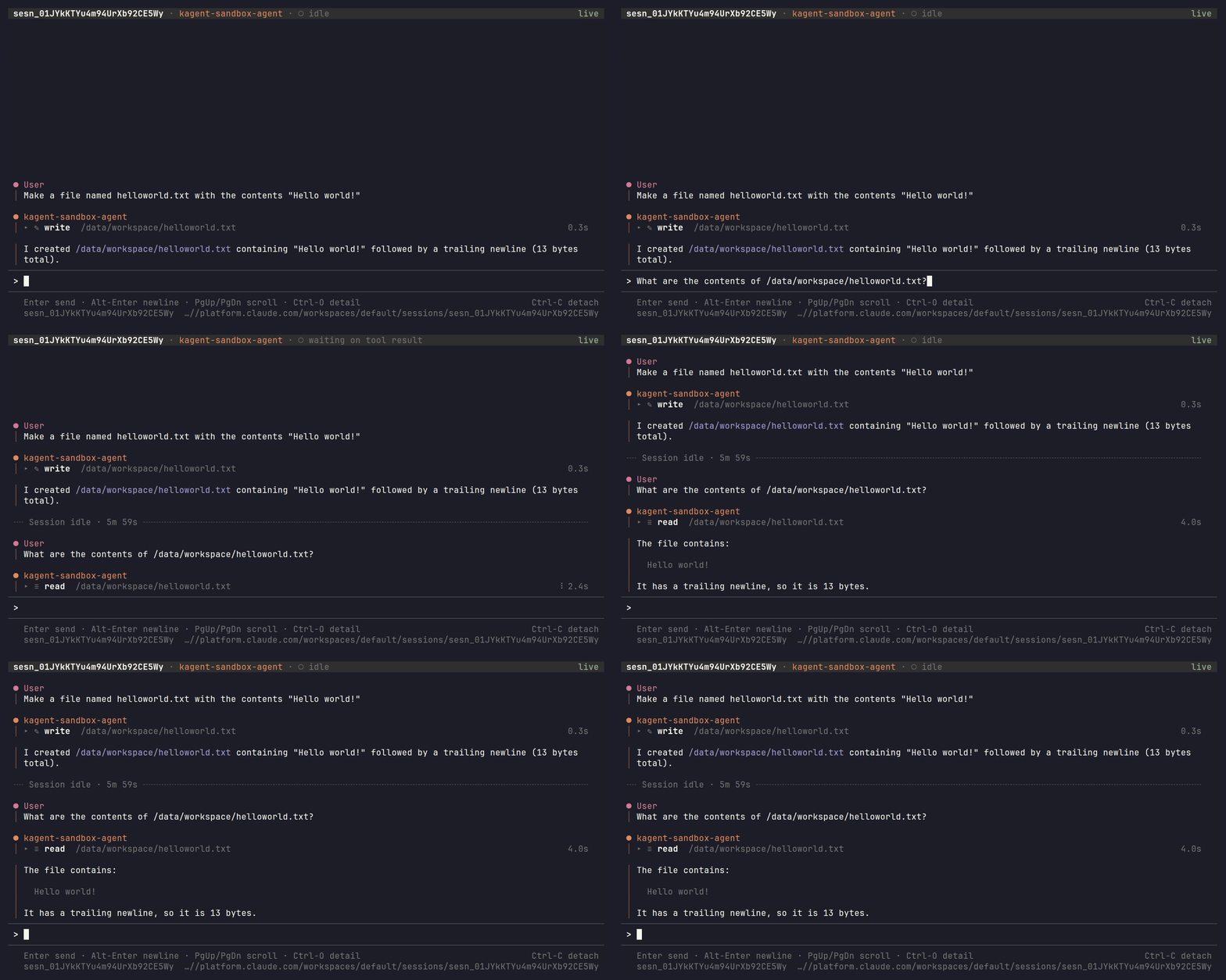
In the same session, we can ask the agent to check the contents of the file we just created. This will automatically resume the sandbox with the filesystem intact!
By default, all outbound network access is denied.
In the same session, if we ask the agent to access kagent.dev, we see that network access is denied.
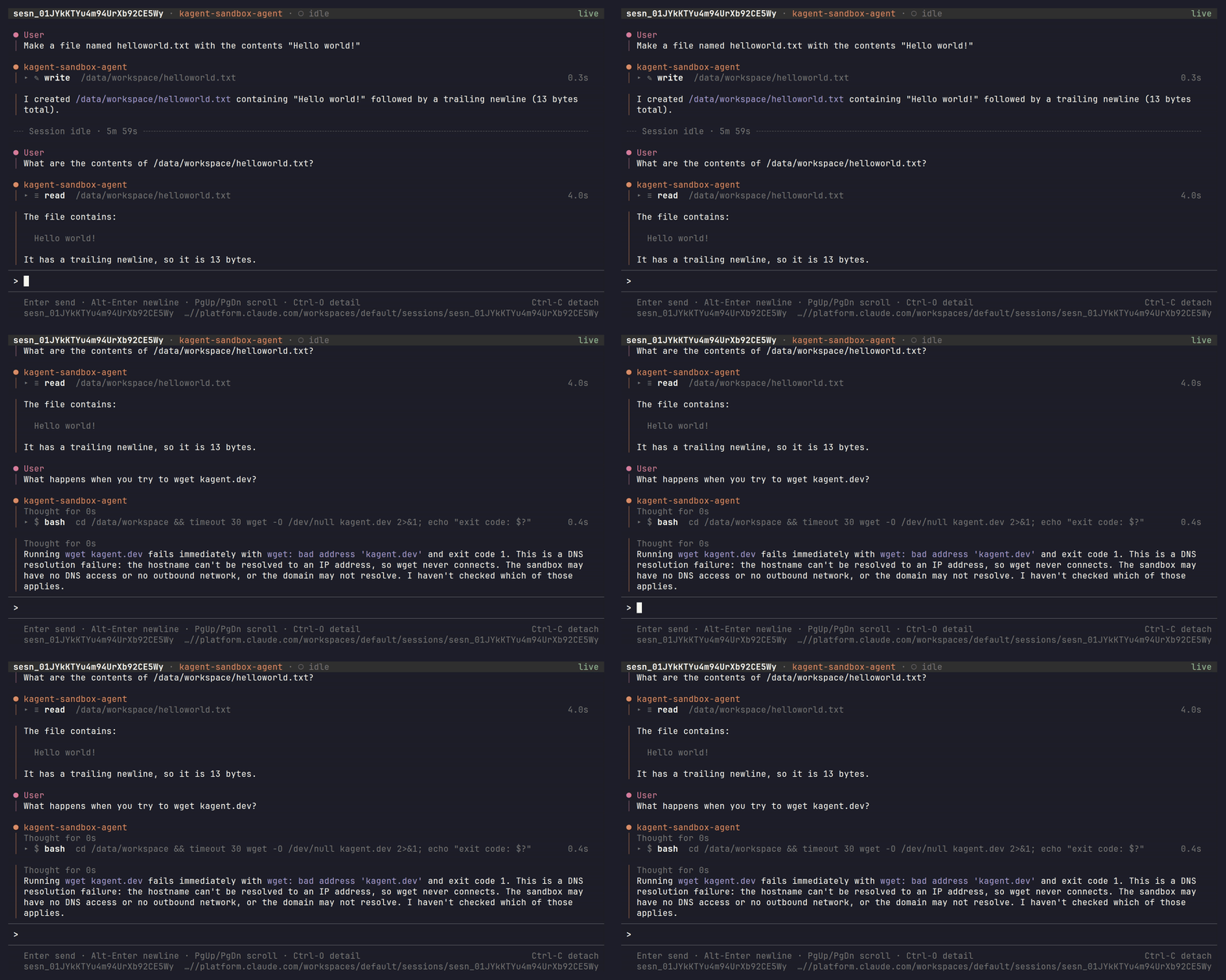
You can dynamically control which websites your agent can access using Egress Policies. These policies also let you inject credentials into your agent's outbound requests without placing those credentials in the sandbox.
What's next#
We are excited to expand the Sandbox API and deepen its integration with Anthropic self-hosted sandboxes.
We plan to make the API more expressive so operators can control which agents get which SandboxTemplate.
We also plan to improve suspension and resumption so you can run more sandboxes on your cluster.
Finally, we hope to release integrations for other managed agent platforms!