Agents on Every Cloud#
Solo.io has published the open source distributions of kagent and agentgateway on all three major cloud marketplaces: AWS Marketplace, Microsoft Azure Marketplace, and Google Cloud Marketplace. Both are free to deploy, and both install into your cluster the same way you already consume other cloud services: subscribe, pick a cluster, done. No Helm repo setup, no copying manifests from a README, and the deployment shows up in your cloud account alongside everything else you run there.
A quick word on the projects themselves. Both started at Solo.io and both were donated to open foundations: kagent is a CNCF project, and agentgateway is part of the Linux Foundation. kagent is a Kubernetes-native framework for building and running AI agents. You declare agents, model configurations, and MCP tools as Kubernetes resources, and the kagent controller runs them, with a web UI on top and pluggable LLM providers (OpenAI, Anthropic, Azure OpenAI, Gemini, Ollama). agentgateway is an AI-native data plane built on the Kubernetes Gateway API. It speaks the protocols agents actually use, MCP and A2A, and adds LLM routing and failover, prompt guards, and observability for agent traffic.
Each one is useful on its own. Together, one extends the other: kagent gives you agents running in your cluster, and agentgateway extends them with a real network edge, so agents and tools stop being cluster-internal experiments and become services you can expose, secure, and observe like anything else in production. In the walkthrough below we deploy both from the marketplace and connect them.
Here is where you can find the listings today:
| kagent | agentgateway | |
|---|---|---|
| AWS Marketplace | listing | listing |
| Azure Marketplace | listing | listing |
| Google Cloud Marketplace | listing | listing |
The exact install flow differs per cloud (EKS add-on or Helm on AWS, a Kubernetes application on Azure, click-to-deploy on Google Cloud), and each one has a dedicated walkthrough:
- Installing kagent and agentgateway from AWS Marketplace (EKS add-on and Helm)
- Installing kagent and agentgateway from Azure Marketplace
- Installing kagent and agentgateway from Google Cloud Marketplace
The rest of this post is the part that is the same everywhere: what you get after the marketplace install, and how the two products work together. Everything below was run on real marketplace installs across the three clouds with both products installed.
From marketplace install to a running agent#
You need a Kubernetes cluster, kubectl access to it, and an LLM provider API key (we use OpenAI here). kagent does not run any agents until a provider is configured, so the key is the one real prerequisite.
agentgateway builds on the upstream Kubernetes Gateway API, so its only prerequisite is the standard CRDs:
kubectl apply --server-side -f https://github.com/kubernetes-sigs/gateway-api/releases/download/v1.5.0/standard-install.yaml
Install both products from your cloud's marketplace (steps in the per-cloud posts above). agentgateway lands in the agentgateway-system namespace and kagent in the kagent namespace. Whichever cloud you used, the result looks the same:
$ kubectl get pods -n agentgateway-systemNAME READY STATUS RESTARTS AGEagentgateway-cdd8744df-4rb7k 1/1 Running 0 2m$ kubectl get pods -n kagentNAME READY STATUS RESTARTS AGEkagent-controller-7974bb886-ch8v7 1/1 Running 0 5mkagent-kmcp-controller-manager-bc49969c4-crhjv 1/1 Running 0 5mkagent-postgresql-85d75cbd57-knpqf 1/1 Running 0 5mkagent-tools-6cb4449d6b-hzfsr 1/1 Running 0 5mkagent-ui-75f8449979-96km2 1/1 Running 0 5m
That is the whole platform: the kagent controller and UI, kmcp for serving MCP tools, a bundled PostgreSQL for state, and the agentgateway control plane watching for Gateway API resources. (Exact resource names vary a little per platform: on AKS, for example, they carry the extension instance name you chose at install, so kagent-controller becomes <extension-name>-controller.) kagent also registers a set of CRDs that make agents ordinary Kubernetes resources:
$ kubectl get crd | grep kagent.devagentharnesses.kagent.devagents.kagent.devmcpservers.kagent.devmemories.kagent.devmodelconfigs.kagent.devmodelproviderconfigs.kagent.devremotemcpservers.kagent.devsandboxagents.kagent.devtoolservers.kagent.dev
Configure a model provider#
Deployed on Google Cloud? Skip this section: the deploy form already collected your provider choice and created the ModelConfig (and secret, if the provider uses a key), so jump straight to creating an agent.
On AWS and Azure, give kagent an LLM to talk to. Create a secret with your API key and a ModelConfig that references it:
kubectl create secret generic kagent-openai -n kagent \--from-literal=OPENAI_API_KEY=$OPENAI_API_KEY
kubectl apply -f - <<EOFapiVersion: kagent.dev/v1alpha2kind: ModelConfigmetadata:name: default-model-confignamespace: kagentspec:model: gpt-4o-miniprovider: OpenAIapiKeySecret: kagent-openaiapiKeySecretKey: OPENAI_API_KEYEOF
Note: Other providers (Anthropic, Azure OpenAI, Gemini, Ollama) work the same way; see the kagent provider docs.
Create an agent#
An agent is a resource like any other. The declarative type means the whole agent, model, instructions, and tools, is described by the resource and runs on kagent's built-in runtime. The tools reference attaches the MCP tool server that ships with kagent, so the agent can actually inspect the cluster it lives in (the name follows the install, like the controller service; check with kubectl get remotemcpservers -n kagent):
kubectl apply -f - <<EOFapiVersion: kagent.dev/v1alpha2kind: Agentmetadata:name: k8s-helpernamespace: kagentspec:description: Answers questions about workloads in this clustertype: Declarativedeclarative:modelConfig: default-model-configsystemMessage: |You are a Kubernetes assistant. Answer questions about theworkloads running in this cluster using the tools available to you.tools:- type: McpServermcpServer:apiGroup: kagent.devkind: RemoteMCPServername: kagent-tool-serverEOF
The controller spins up a pod for the agent and reports readiness on the resource:
$ kubectl get agents -n kagentNAME TYPE RUNTIME READY ACCEPTEDk8s-helper Declarative python True True
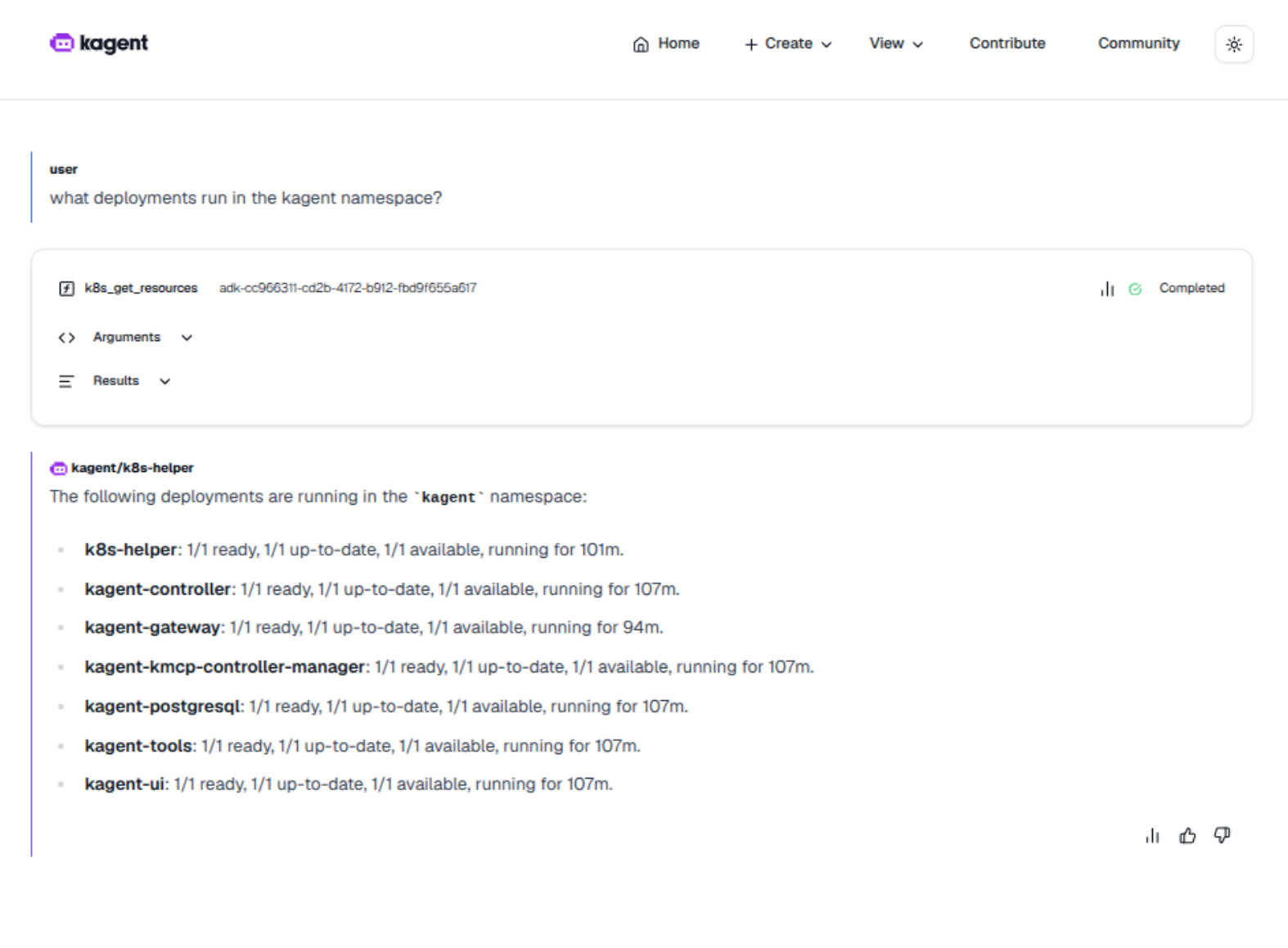
For a look around, port-forward the UI at kubectl -n kagent port-forward svc/kagent-ui 8080:8080 (use kagentaks-ui in Azure) and open http://localhost:8080 (hit Skip Wizard on the bottom for this demo). Now you can chat with the agent there, and kagent ships prebuilt agents and MCP tools for Kubernetes, Helm, Istio, and more.
Put agentgateway in front of it#
So far the agent lives inside the cluster, reachable through a port-forward. That is fine for a demo and not fine for anything real: other teams, other agents, and external callers need a governed way in, and you need to see and control that traffic. This is where agentgateway extends kagent.
kagent exposes every agent over A2A (Agent2Agent), the open protocol for agent-to-agent communication, served by the kagent controller at /api/a2a/<namespace>/<agent-name>. agentgateway understands A2A natively, so exposing the agent is a plain Gateway API exercise:
kubectl apply -f - <<EOFapiVersion: gateway.networking.k8s.io/v1kind: Gatewaymetadata:name: kagent-gatewaynamespace: kagentspec:gatewayClassName: agentgatewaylisteners:- name: httpport: 8080protocol: HTTPallowedRoutes:namespaces:from: Same---apiVersion: gateway.networking.k8s.io/v1kind: HTTPRoutemetadata:name: k8s-helper-a2anamespace: kagentspec:parentRefs:- name: kagent-gatewayrules:- backendRefs:- name: kagent-controller # in AKS use kagentaks-controllerport: 8083EOF
The backendRef points at the kagent controller service on port 8083; check the service name in your cluster with kubectl get svc -n kagent (it follows the install name, for example kagentaks-controller on AKS).
The agentgateway controller picks up the Gateway, deploys a proxy for it, and (on a cloud cluster) provisions a load balancer. Within a minute the Gateway is programmed and has an address:
$ kubectl get gateway,httproute -n kagentNAME CLASS ADDRESS PROGRAMMED AGEgateway.gateway.networking.k8s.io/kagent-gateway agentgateway aacf335c...elb.amazonaws.com True 60sNAME HOSTNAMES AGEhttproute.gateway.networking.k8s.io/k8s-helper-a2a 60s
Now the agent has an address outside the cluster. Grab it and fetch the agent card, the A2A discovery document that tells other agents what this one can do:
GW=$(kubectl get gateway kagent-gateway -n kagent \-o jsonpath='{.status.addresses[0].value}')curl -s http://$GW:8080/api/a2a/kagent/k8s-helper/.well-known/agent-card.json | jq .
{"name": "k8s_helper","description": "Answers questions about workloads in this cluster","capabilities": { "streaming": true },"preferredTransport": "JSONRPC","protocolVersion": "0.3",...}
And talk to it. A2A is JSON-RPC over HTTP, so a plain curl works; any A2A client library works the same way:
curl -s http://$GW:8080/api/a2a/kagent/k8s-helper/ \-H 'Content-Type: application/json' \-d '{"jsonrpc":"2.0","id":"1","method":"message/send","params":{"message":{"kind":"message","messageId":"demo-1","role":"user","parts":[{"kind":"text","text":"In one sentence: what do you do?"}]}}}' \| jq -r '.result.artifacts[0].parts[0].text'
I provide information and answers regarding the workloads running in the Kubernetes cluster.That request went from the internet, through the agentgateway proxy, to the agent's A2A endpoint. And because the data plane understands what it is routing, you get structured visibility into agent traffic for free:
$ kubectl logs -n kagent deploy/kagent-gateway --tail 12026-08-11T20:34:26.791178Z info request gateway=kagent/kagent-gateway listener=httproute=kagent/k8s-helper-a2a endpoint=10.48.0.7:8083 src.addr=10.48.1.1:22687 http.method=POSThttp.host=136.115.154.87 http.path=/api/a2a/kagent/k8s-helper/ http.version=HTTP/1.1http.status=200 protocol=http duration=1008ms
From here the interesting part starts. Because the traffic flows through agentgateway, you get the things you would expect from a gateway, applied to agent protocols: per-route policies, authn/z in front of agents, rate limits, and metrics and traces for every agent and tool call (the chart ships Prometheus endpoints and a Grafana dashboard out of the box). The same gateway can also front MCP tool servers and route LLM traffic with failover between providers, so as your agent footprint grows, the governance model does not change.
The extension works in the other direction too: agents you build in kagent become A2A services other teams can consume through the gateway, and tools you put behind agentgateway become available to any MCP-capable agent, not just kagent's.
Wrapping up#
Two open source projects, three marketplaces, one deployment model: pick your cloud, subscribe, and you have an agent runtime and an agent-aware gateway running in your cluster. The per-cloud posts cover the marketplace specifics:
- AWS Marketplace: EKS add-on and Helm
- Azure Marketplace: Kubernetes application
- Google Cloud Marketplace: click-to-deploy
Docs and source, if you want to go deeper: kagent.dev (GitHub) and agentgateway.dev (GitHub).